Configure Launchpad Settings
The Admin > Launchpads page allows Console Admins to manage global settings for your Launchpads:
-
Launchpad upgrades
-
Device passcodes
-
Automatic badge reader configuration. Supported in MAM 7.4 and later.
-
Launchpad monitoring
-
Launchpad registration tokens for mass deployment
-
Custom Launchpad options
Configure Automatic Upgrades
Configure automatic upgrades for registered Launchpads.
-
For production use, Imprivata recommends that you switch the setting to OFF.
-
This allows you to more carefully manage your workstations, and test new Launchpad releases.
-
You may update one or more Launchpads manually using the Launchpads List or Launchpad Detail pages.
-
-
When automated upgrades are enabled, even offline Launchpads will be upgraded automatically to the latest version of software when they connect.
-
Automatic upgrades of Launchpads requires that the local Mac user be a macOS local admin, or the GroundControl Launchpad.app must be installed in a directory the local user has full file permissions over.
Configure Device Passcode Management
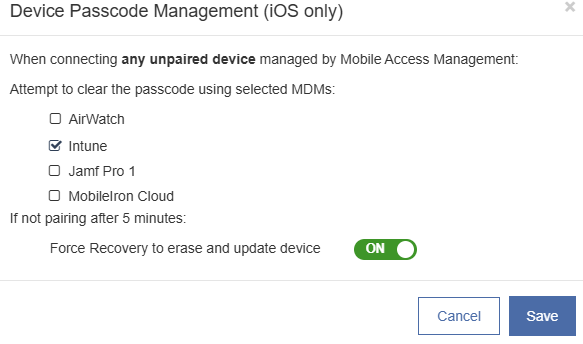
Apple devices will not fully connect to MAM when they are locked with a passcode. To resolve pairing issues, the system can clear the passcode using mobile device management (MDM) commands.
Click to enlarge
-
The dialog lists any MDM you have configured with API integration. Select the MDMs that will be used for your device enrollment.
-
Passcodes will be cleared only from devices managed by MAM. These are devices with a device status of Active or Retired.
-
The Launchpad attempts to pair with devices for up to 5 minutes, regardless of whether the server sends a clear passcode command.
If still unpaired after 5 minutes, MAM automates a force recovery, erasing and updating the devices. This is helpful for Wi-Fi-only devices that are password-locked and have not been unlocked since their last reboot.
Automatic Badge Reader Configuration
Supported in MAM 7.4 and later.
For more information, see Automatic Badge Reader Configuration.
Configure Launchpad Monitoring
Launchpad Monitoring is recommended for production Launchpads in use 24 × 7. For more information, see Launchpad Monitoring.
Customize the Launchpad Display
Customize which columns are displayed on the Launchpad app and the Launchpad Details page.
Manage the Launchpad Registration Tokens for Mass Deployment
Manage the registration tokens generated for the Launchpad mass deployment installers.
For more information, see Manage Launchpad Registration Tokens for Mass Deployment.
Configure Custom Launchpad Options
Contact Imprivata at support.imprivata.com for questions regarding this feature.


