Migrating to a G4 Enterprise
The following sections describe how to perform a migration to G4:
Release History and Supported Migration Paths
The release introduction history and supported migration path history of the Imprivata G4 (fourth generation) appliances and enterprise is:
| Imprivata Release | Notes |
|---|---|
| Enterprise Access Management with SSO 23.3 | The final release to support direct enterprise migrations from a G2 to a G4 enterprise. |
| Enterprise Access Management with SSO 23.2 |
Added support for the following enterprise migrations:
|
| G3 appliance end of life | G3 appliances reached their end of life as of December 31, 2023. |
| Enterprise Access Management with SSO 7.12 |
The last major release in the 7.x release naming format. Beginning with 23.2, Imprivata adopted a new numbering scheme to reflect the yearly release cadence. |
| Enterprise Access Management with SSO 7.11 and later releases |
Require G4 appliances. 7.10 was the last release supported on G3 appliances. |
| Enterprise Access Management with SSO 7.10 |
Introduced the General Availability (GA) release of the G4 appliance and enterprise to all customers, including for G3 or G2 on premises enterprise migrations to G4 on premises.
|
| Enterprise Access Management with SSO 7.10 |
Supported either G3 or G4 appliances, but not both G3 and G4 appliances on the same enterprise. All appliances in an enterprise must be on the same release. |
| Enterprise Access Management with SSO 7.8 | Introduced the Controlled Availability (CA) release of the G4 appliance and enterprise to select customers or on request. |
Migrating to a G4 production enterprise is usually a one-time process in which you export your current G3 or G2 production enterprise and import it into a G4 production enterprise. However, if you already migrated to G4 on premises, and you now want to move your G4 enterprise to a public cloud infrastructure, you can migrate again from G4 on premises to G4 on Azure. For this second migration, you again export your current production enterprise (G4 on premises) and import it into a new G4 on an Azure production enterprise.
When you perform a migration to G4:
-
It upgrades the environment to the latest major release, so you don’t need to perform a separate upgrade.
-
The migration process also includes installing any available hotfix releases for the latest release of Enterprise Access Management with SSO and Enterprise Access Management with MFA.
This documentation is intended for administrators who are performing one of the following migrations:
-
G2 on premises to G4 on premises
-
G3 on premises to G4 on premises
-
G3 on premises to G4 on Azure
-
G3 on Azure to G4 on Azure
-
Hybrid G3 to hybrid G4
-
G4 on premises to G4 on Azure
Due to the variety of migrations covered, this documentation uses the generic terms original enterprise and original appliances for your current production enterprise and appliances, and new G4 enterprise and new G4 appliances for the G4 enterprise and appliances to which you are migrating.
-
If you have a PDF of this G4 migration documentation, and if you are migrating to G4 on Azure or are migrating a hybrid G3 to hybrid G4 enterprise, then also create a PDF of the help topic "Deploy G4 Appliances on Azure" in the Enterprise Access Management with SSO online help. For migrations to G4 on Azure and for migrations of hybrid enterprises, that topic becomes part of the migration procedures.
-
If your organization uses individual identity proofing with DigiCert for Imprivata Confirm ID for Electronic Prescription of Controlled Substances (EPCS), then also create a PDF of the help topic "Block Communication with DigiCert on an Imprivata Test Appliance" in the Enterprise Access Management with MFA online help. For organizations that use individual identity proofing with DigiCert, that topic becomes part of the migration procedures.
Before You Start the Migration
Familiarize yourself with the following information before beginning the migration.
 G4 Appliance Types, Databases, and Locations
A G4 enterprise is composed of G4 virtual appliances. There are two types of G4 appliances: database appliances and service appliances.
-
A database appliance hosts an instance of the enterprise database.
-
A G4 enterprise typically has the enforced maximum of two database appliances for redundancy.
-
Database replication occurs only between database appliances.
-
The database appliances also service endpoint agent requests for authentication.
-
In a G4 enterprise, there is no longer a concept of an audit appliance. The database appliances contain all audit data.
-
-
Service appliances only service endpoint agent requests and do not have an active instance of the database.
-
No database replication traffic goes through service appliances.
-
A G4 enterprise typically can have up to the recommended maximum of four service appliances, and thus six appliances in total.
-
Having more than six appliances usually does not improve performance.
-
It is best to place service appliances in the same data center as a database appliance to reduce the time needed for the service appliances to service requests from endpoint agents.
-
For more information on G4 appliance types, see "G4 Appliance Types" in the Enterprise Access Management with SSO online help.
In your migration planning, determine the number and location of each type of G4 appliance to deploy. If any firewalls exist between the planned locations of your G4 appliances, then you must plan to open specific ports on those firewalls to enable the appliances to communicate. You should also determine the size of each appliance, meaning the CPU count and RAM size options to specify.
For more information, see Stage G4 Appliances below and "Appliance System Requirements and Guidance" and "Communication Ports" in the Enterprise Access Management with SSO online help.
Enterprise Sites May Need Redesign
Some existing customers will need to redesign their sites and should consult with a Pre-Sales Engineering Solution Architect for some guidance and discussion before proceeding with migration.
If a redesign is needed, you should redesign before migration and then implement the new design during migration. Although you can implement a new design after migration, it is easier and takes fewer steps to implement it during migration. A few key factors to consider include:
-
In a G4 enterprise, only one or two sites are used, and Imprivata recommends a maximum of two sites. Although a G4 enterprise can include any number of sites, having more than two sites no longer serves any purpose. G4 sites can cover WANs spanning geographic continents. With a maximum of two database appliances allowed in a G4 enterprise and the fact that service appliances should be co-located with database appliances, having an enterprise spread over more than two physical data centers is not optimal.
-
Appliances in a G4 enterprise can fail over to each other without requiring additional sites or secondary failover sites.
-
G4 enterprises avoid the resources and cost of a hot standby site. Hot standby sites are not needed or optimal for a G4 enterprise.
For more information on G4 sites, see "Imprivata Sites for G4 Enterprises" in the Enterprise Access Management with SSO online help.
Imprivata Mobile Solutions - Plan for the Enterprise Migration Downtime
Applies to Imprivata enterprises having integrations with Imprivata Mobile Access Management or Imprivata MDA. Otherwise, skip this section.
Familiarize yourself with the following behaviors and required configurations for the Imprivata mobile solutions when the enterprise is being migrated.
Configure Imprivata MDA Offline Authentication
Beginning with 7.16, Imprivata MDA supports offline authentication. Earlier releases of Imprivata MDA do not support offline authentication.
-
By default, offline authentication for Imprivata MDA is not enabled. You must configure offline authentication in Imprivata MDA in advance of an enterprise migration.
For more information, see the Imprivata MDA help.
-
Imprivata MDA offline authentication allows users to access their mobile device and apps when the device loses network connection or loses connection to the Imprivata appliance.
-
This mode works only after an initial authentication with Imprivata MDA while the device is online and connected to the network and Imprivata appliance.
-
At the time the device loses network connection, the Imprivata MDA app uses cached encrypted credentials until it can contact the server again.
-
When offline, Imprivata MDA accepts the last validated user credentials, including proximity card, Imprivata PIN (as a second factor), and username + password.
-
For username and password, the user must enter their username and password at least once while in online mode. Imprivata MDA persists the user password that can then be used for offline authentication. When used with either proximity card or Imprivata PIN as the second authentication factor, Imprivata MDA additionally retrieves the user password and stores it for potential offline authentication.
-
For proximity cards, the user must tap at least once while in online mode.
-
For Imprivata PIN, the user must enter their PIN as a second factor at least once in online mode.
-
For Guest and Admin Access, the Imprivata MDA workflows work similarly to Imprivata MDA online, including device unlock and device lock and logout after Guest or Admin session.
-
-
Imprivata MDA transitions back to online as soon as the Imprivata appliances become available again.
Limitations
Imprivata MDA offline authentication cannot be used with:
-
User switches
-
Out of band password changes
-
Third party app credentials changes
-
Authentication to Manage Passwords tool
-
Proximity card enrollments
-
Imprivata PIN expiration and renewals
Planning for Enterprise Migration
When you expect network outages during the enterprise migration, you must plan in advance to configure offline authentication for Imprivata MDA.
Assumptions
The procedure assumes that you have already configured Imprivata MDA, deployed the mobile app profiles, and configured the mobile policy and user authentication.
Configure for Imprivata MDA Offline Authentication
To configure the offline authentication, add the following key to the AppConfig in your MDM:
-
The AppConfig Configuration Key field for this feature is "ConfigFlags".
-
The AppConfig Value Type for this feature is "String".
-
The AppConfig Value is allowOfflineMode - Enables offline mode, allowing authenticated users to Imprivata MDA to unlock the device and have SSO available when in offline mode.
Require Reauthentication When Transitioning Offline to Online
To configure Imprivata MDA to require users to reauthenticate when transitioning from offline to online, add the following key to AppConfig in your MDM:
-
The AppConfig Configuration Key field for this feature is "ConfigFlags".
-
The AppConfig Value Type for this feature is "String".
-
The AppConfig Value is offlineToOnlineReAuth - When set, instructs Imprivata MDA to require the user to reauthenticate when it transitions from offline to online, only when the user session was last unlocked in offline. The flag has no effect on online established sessions. Used in combination with allowOfflineMode.
Mobile Access Management Launchpad Badge Tap Caching
In Mobile Access Management (formerly GroundControl), the Launchpads cache the users' OneSign badge data for 7 days, by default.
-
During the downtime of an enterprise migration, the Launchpads will use the cached badge data to allow users to check out devices using badge taps.
-
During the downtime, Password Autofill into the mobile apps will not be available.
To change the default number of days to cache badge data on the MAM Launchpads, contact Imprivata Support.
Minimum Required Releases for G3 Enterprises
If you are migrating from a G2 enterprise, skip this section and instead see
Before beginning the migration, a G3 enterprise, including all Imprivata agents and any Imprivata ProveID Embedded agents, should be operating on release 7.2 SP1 or later, and on a maintained release. Meeting this requirement ensures that existing agents can communicate with the new G4 appliances until those agents are upgraded.
G4 appliances are not certified as backward compatible with Imprivata agents operating on releases earlier than 7.2 SP1, although many of those agents should work with a G4 appliance.
The minimum 7.2 SP1 Imprivata agent requirement for migration is solely based on our Quality Engineering teams having extensively tested the G4 migration using the 7.2 SP1 Imprivata agent on endpoints, but not with Imprivata endpoint agents for earlier releases. Therefore, if your G3 appliances are operating on 7.2 or earlier, before beginning the migration, consider upgrading your appliances, Imprivata agents, and any Imprivata ProveID Embedded agents to at least 7.2 SP1, and must be on the latest available hotfix of a currently maintained release.
Immediately or very soon after migration, install the latest Imprivata agents. If ProveID Embedded is used in your enterprise, also install the latest Imprivata ProveID Embedded agents.
The Imprivata agent release and any ProveID Embedded release must be equal to or earlier than the Imprivata appliance release. Your enterprise should always be operating on a maintained release.
For a list of maintained releases, see " Supported Components" in the Imprivata Environment Reference.
Run a report to identify the Imprivata agent releases installed on your endpoints.
To run the report, in the Imprivata Admin Console, click Reports > Agent deployment report.
Minimum Required Release for G2 Enterprises
If you are migrating from a G3 enterprise, skip this section and instead see
In a G2 enterprise, all Imprivata agents must be operating at release 6.0 before beginning the migration. Meeting this requirement ensures that existing Imprivata agents can communicate with the new G4 appliances until those agents are upgraded. The 6.0 agent can communicate with G4 appliances to retrieve the new G4 network topology. Release 6.0 was the last version released for the G2 appliance, and 6.0 reached end of life on December 31, 2020, so it is important to upgrade 6.0 agents to a maintained release as a later step in the migration process.
For G2 to G4 migrations, there can be up to a three-step process to fully upgrade appliances and agents:
-
If your Imprivata agents are at a release earlier than 6.0, you must upgrade them to 6.0. However, you must not upgrade agents to versions after 6.0 at this point, because any versions after 6.0 will not work with G2 appliances.
-
Migrate your enterprise, which upgrades your appliances to the latest major release, for example 7.10 (or later versions when available).
-
Quickly upgrade your endpoint agents from 6.0 to the latest available release, as part of the process of transitioning to the G4 enterprise. The agent version must be equal to or earlier than the appliance version, and you should always be using a supported version of appliances and agents.
For a list of maintained releases, see " Supported Component" in the Imprivata Environment Reference.
Run a report to identify the Imprivata agent versions installed on your endpoints.
To run the report, in the Imprivata Admin Console, click Reports > Agent deployment report.
The Imprivata Agent and Removed Operating System Support
Microsoft Windows 7 reached the end of extended support by Microsoft in January 2020. Starting in 2020, new Imprivata Enterprise Access Management releases will be supported on Windows 10 and Windows 11 only.
Beginning with 7.1:
-
The Imprivata single–user computer (type 1) agent and shared–kiosk workstation (type 2) agent can no longer be installed on Microsoft Windows 7 endpoint computers.
-
The Imprivata Citrix or Terminal Server agent can no longer be installed on Microsoft Windows Server 2008.
For more information, see "Windows 7 Support and Maintenance" in the Imprivata Environment Reference.
Renew G2 Enterprise Certificates that Use MD5 or SHA-1
G4 appliances do not support a certificate that was issued using an MD5 or SHA-1 signature hash. G2 appliances used certificates that were issued using MD5 or SHA-1 signature hashes. To establish a secure TLS connection to Imprivata agents after the migration, G4 appliances require that the certificate be signed using SHA-2, for example, SHA-256:
-
Before beginning the enterprise migration, verify that the CA certificate is signed using an SHA-2 signature hash.
-
If required, renew the CA certificate for the enterprise, re-sign the server certificate that is on each appliance, and upload the new certificate to ProveID Embedded workstations.
To check the signature hash of the CA certificate:
-
Log into the Imprivata Appliance Console.
-
Open the Security tab.
If the CA certificate is using an unsupported signature hash, a warning message appears.
Agent SSL Validation and TLS Support
This section applies only if your Imprivata agents are enabled for SSL validation. If they are not, skip this section.
The following TLS versions are supported by Enterprise Access Management components:
-
G4 appliances running at 7.8 or later support TLS 1.3 and 1.2.
-
G4 appliances do not support TLS 1.1 and 1.0.
-
Imprivata agents running at 7.7 or later support TLS 1.3 and 1.2.
-
Imprivata agents running at 7.6 or earlier support TLS 1.2.
Windows Server 2012 defaults to TLS 1.0:
If your Windows endpoints are not already configured to use TLS 1.3 or 1.2, you may need to reconfigure them to use TLS 1.3 or 1.2 to prevent communication from failing between G4 appliances and Imprivata agents.
Determine if Agent SSL Validation is Enabled
The Imprivata agent is enabled for SSL validation if:
-
Your enterprise is licensed for Imprivata Confirm ID EPCS.
SSL validation is required on all endpoints where users are e-prescribing controlled substances.
-
The functionality was optionally enabled.
While required for EPCS, some enterprises choose to enable SSL validation, regardless of the clinical workflow.
If you are unsure which Windows endpoint agents are enabled for SSL validation, you can scan the Windows registry for the SSLValidation value of the ISXAgent registry key. The following table details this value:
| Name | Location | Value |
|---|---|---|
| SSLValidation |
|
Enabled=1 Disabled=0 |
What to Expect and How to Proceed
The factor to consider when determining what action, if any, is required to prevent a service disruption associated with Windows defaulting to TLS 1.0, is whether your enterprise migration plan includes upgrading or installing new agents. No action is required before redirecting most existing agents to G4 appliances. However, any agents that support only TLS 1.1 or 1.0 will not communicate with a G4 appliance, so you must upgrade or replace them before migrating your enterprise to G4.
For new agent installations or upgrades, installing or upgrading an agent to a currently maintained version requires no action before directing the agents to G4 appliances, so long as the latest available hotfix is used. The latest available hotfix of all currently maintained versions attempts to use TLS 1.2 and if that fails, falls back to TLS 1.1, regardless of what version of TLS the Windows endpoint defaults to.
For a list of currently maintained releases, see the Enterprise Access Management with SSO Supported Components.
Appliance IP Address Changes and Agent Connectivity
Migrating to a new G4 enterprise often can change the IP addresses of your new G4 appliances compared to the IP addresses of your original appliances. Those changes can affect connectivity with Imprivata agents on user endpoints. There are multiple migration paths for which the IP addresses change from your original to new appliances, and only one migration path in which they remain the same. The path for which the IP addresses remain the same is described first, followed by the other paths.
When migrating to a new on-premises G4 enterprise, you can deploy a new G4 enterprise to the same subnet as the existing enterprise or to a new subnet. However, where the G4 appliances reside may have implications for existing Imprivata agent connectivity.
To begin the migration, you stage new G4 appliances and add each one to the network with a new IP address. Consider the following:
-
Migrating all appliances within the same subnet is most efficient:
-
The IP addresses of the new G4 appliances are temporary.
They are only used until you switch the new G4 enterprise to production.
-
Switching the new G4 enterprise to production automatically switches the IP addresses of the new appliances to the original IP addresses of the appliances they are replacing.
As a result, endpoint connectivity remains uninterrupted.
-
-
Migrating one or more appliances to a different subnet in a new on-premises G4 enterprise affects Imprivata agent connectivity:
-
The IP addresses of the new G4 appliances are permanent.
You are required to adopt the new IP addresses when you transition the new G4 enterprise to production.
- It is not possible to switch the IP addresses of the new appliances to the original IP addresses of the appliances they are replacing.
-
The following migrations also cause permanent IP address changes for the new appliances compared to the original appliances:
-
Migrating any G3 or G4 enterprise to a new G4 enterprise on Azure.
-
Migrating a hybrid (mixed on premises and on Azure) G3 enterprise to a hybrid G4 enterprise.
For the migrations in which the appliance IP addresses change, you must plan for and manage the redirection of all endpoints to the new G4 appliances before transitioning the new G4 enterprise to production.
For more information, see Manage the Redirection of Endpoints to Appliances in a New Subnet or on Azure or on a Hybrid Enterprise.
Obtain Your G4 Appliances and License
Contact your Imprivata account executive or the Imprivata Customer Success team to obtain the new G4 appliances and required G4 license:
-
The G4 appliance is supported on VMware ESXi, Microsoft Hyper-V, Nutanix Acropolis (AOS), and Microsoft Azure platforms.
-
You need a G4 license for all migrations to G4. If you are migrating from G4 on premises to G4 on Azure, you can reuse your existing G4 license.
-
G4 license serial numbers begin with the characters "VAG4".
System Requirements
For appliance system requirements, see "Supported Components" in the Imprivata Environment Reference.
Stage G4 Appliances
For each production appliance in your enterprise, stage a corresponding G4 appliance and add it to the network using the sections below that match your platform. If you are migrating a hybrid (on premises and on Azure) G3 enterprise to a hybrid G4 enterprise, then you stage some G4 appliances using one set of sections below and other G4 appliances using the Azure section below.
Take note of each production appliance's IP address and the corresponding IP address of the staged G4 appliances. If you are migrating to G4 on Azure, or if you are migrating a hybrid G3 enterprise to a hybrid G4 enterprise, also note each production appliance’s host name. Importing the current enterprise into the new enterprise requires this information.
The first two G4 appliances you create will be database appliances. Thereafter, all appliances you create will be service appliances. A G4 enterprise typically has at most the enforced maximum of two database appliances and the recommended maximum of four service-only appliances (not including the database appliances that can also act as service appliances).
It is best to place service appliances in the same data center as a database appliance to reduce the time needed for the service appliances to service requests from endpoint agents.
If any firewalls exist between your G4 appliances, then either before or immediately after staging your G4 appliances, you must open specific ports on those firewalls to allow communication between the appliances.
For more information, see "Communication Ports" in the Imprivata Online Help.
-
G4 database appliances require some additional firewall ports to be opened that were not required to be opened for G3 or G2 appliances:
-
They are ports 7809, and 7819 through 7899. They use TCP protocol for two-way communication. These ports are used only for communication between database appliances and are secured using encryption. For more information, see "Communication Ports" in the Imprivata Online Help.
-
-
Ensure that the following ICMP (Internet Control Message Protocol) control message types are not blocked. Note that these are not TCP or UDP ports:
ICMP Control Message Type Protocol Description Use by Imprivata Appliances ICMP Type 0
ICMP Echo Reply
These allow ping tests to occur between appliances to test for the presence of a remote appliance. ICMP Type 8 ICMP Echo Request ICMP Type 42 ICMP Extended Echo Request ICMP Type 43 ICMP Extended Echo Reply
Having an odd number of appliances in a G4 enterprise is recommended only when migrating from a G3 or G2 enterprise that also has an odd number of appliances. Migrations require the same number of appliances in your G4 enterprise as in your G3 or G2 enterprise, to support the enterprise export from G3 or G2 and import into G4.
After a migration with an odd number of appliances, after you transition your G4 enterprise to production, Imprivata recommends that you transition to a standard deployment configuration.
For details about standard configurations of two, four, and six appliance enterprises, including CPU count and RAM size options per appliance, see "Appliance System Requirements and Guidance" in the Imprivata Online Help.
Stage a G4 Appliance on VMware
Deploy the Appliance
To deploy the appliance:
-
From your fulfillment letter, download and extract the Imprivata Virtual Appliance RAR file.
-
In the vSphere Client, click File > Deploy OVF template.
-
Follow the OVF Deploy Template wizard to complete the deployment.
Consider the following:
-
When the wizard prompts you to customize Networking Properties, leave all values blank. Either your DHCP server networks the appliance, or you network the appliance using the Appliance Configuration wizard.
-
When the wizard prompts you to review the settings, be sure that Power on after deployment is not selected before you finish the deployment.
-
For more information on deploying an OVF template, see your VMware vSphere documentation.
Disable the vApp Options
To disable the vApp options:
-
In the vSphere Client, right-click the virtual appliance, click Edit Settings, and open the Options tab.
-
Click vApp options, and select Disable.
A message appears that prompts you to confirm the action.
-
Click Yes, and then click OK.
Depending on the vSphere version, the exact steps to disable vApps may differ. For more information on disabling vApp options, see the VMware documentation.
Add the Appliance to the Network
To add the appliance to the network:
-
Power on the appliance and open the appliance console to start the appliance initialization scripts.
NOTE:The initialization scripts run in the background and do not display progress. The time to complete is approximately 15 minutes. If you receive a database error message when trying to log in, the appliance has not finished initializing.
If you have a DHCP server enabled for your network, then after the Imprivata database is set up, the DHCP server automatically sets up the network configuration for the appliance. In this case, skip the rest of the procedure in this section.
If you do not have a DHCP server enabled for your network, follow the remaining steps below to manually set up the network configuration for the appliance.
-
In the Imprivata Appliance Console, select Login, and then press Enter.
-
Type menu, and then press Enter.
-
Type the appliance IP address, and then press Enter.
-
If you are migrating the enterprise within the same subnet, this IP address is temporary, until you switch the new G4 enterprise to production.
-
If you are migrating the enterprise across subnets, this IP address is permanent.
NOTE:Migrating an enterprise across subnets has implications for endpoint connectivity to the appliance. For more information, see Appliance IP Address Changes and Agent Connectivity.
-
-
Type the appliance subnet mask, and press Enter.
-
Type the appliance default gateway, and press Enter.
The Imprivata appliance menu appears.
-
Type 6, and then press Enter to exit the Imprivata Appliance Console.
- Close the appliance console.
Stage a G4 Appliance on Microsoft Hyper-V
Deploy the Appliance
To deploy the appliance:
-
From your fulfillment letter, download and extract the Imprivata Virtual Appliance RAR file.
-
In the Hyper-V Manager, click Action > Import Virtual Machine.
-
Browse to imprivata version. Version specifies the version of the appliance.
-
Click Next.
-
Choose the type of import to perform:
-
Register – You have an environment where you have already put all of the virtual machine files exactly where you want them, and you only need Hyper-V to begin using the virtual machine as is.
-
Restore – Your virtual machine files are stored on a file share, or removable drive. For example, you want Hyper-V to move the files to the appropriate location for you, and then register the virtual machine.
-
Copy – You have a set of virtual machine files that you want to import multiple times. For example, using them as a template for new virtual machines. This selection copies the files to an appropriate location, gives the virtual machine a new unique ID, and then registers the virtual machine.
-
-
Click Next, and follow the wizard to complete the deployment.
-
In the Hyper-V Manager, right-click the appliance, and click Settings.
- Select Network Adapter, connect to a virtual switch, and click OK.
Add the Appliance to the Network
To add the appliance to the network:
-
Power on the appliance and open the appliance console to start the appliance initialization scripts.
NOTE:The initialization scripts run in the background and do not display progress. The time to complete is approximately 15 minutes. If you receive a database error message when trying to log in, the appliance has not finished initializing.
If you have a DHCP server enabled for your network, then after the Imprivata database is set up, the DHCP server automatically sets up the network configuration for the appliance. In this case, skip the rest of the procedure in this section.
If you do not have a DHCP server enabled for your network, follow the remaining steps below to manually set up the network configuration for the appliance.
-
In the Imprivata Appliance Console, select Login, and then press Enter.
-
Type menu, and then press Enter.
-
Type the appliance IP address, and then press Enter.
-
If you are migrating the enterprise within the same subnet, this IP address is temporary, until you switch the new G4 enterprise to production.
-
If you are migrating the enterprise across subnets, this IP address is permanent.
NOTE:Migrating an enterprise across subnets has implications for endpoint connectivity to the appliance. For more information, see Appliance IP Address Changes and Agent Connectivity.
-
-
Type the appliance subnet mask, and press Enter.
-
Type the appliance default gateway, and press Enter.
The Imprivata appliance menu appears.
-
Type 6, and then press Enter to exit the Imprivata Appliance Console.
- Close the appliance console.
Stage a G4 Appliance on Nutanix AHV
Create the Appliance Image
You upload the Imprivata VMDK file (system-disk1) to create the appliance image.
To create the image:
-
From your fulfillment letter, download and extract the Imprivata Virtual Appliance RAR file.
-
In the Prism UI, select Settings from the main menu.

-
On the Settings page, click Image Configuration, and then click Upload Image.
-
Enter a name for the image.
-
From the Image Type list, select Disk.
-
Select a storage container, specify the image source location, and then click Save.
Deploy the Appliance
To deploy the appliance:
-
In Prism UI, select VM from the main menu, and then click Create VM.

-
On the Create VM dialog:
-
Enter a name and select a timezone.
-
Under Compute Details, allocate at the system resources, and then click Add New Disk.
-
-
On the Add Disk dialog:
-
From the Operation list, select Clone from Image Service.
-
From the Image list, select the appliance image that was created using the Imprivata VMDK file, and click Add.
-
-
On the Create VM dialog:
-
Under Disks, select Disk as the boot device.
-
Under Network Adapters (NIC), click Add New NIC.
-
-
On the Create NIC dialog:
-
From the VLAN list, select the target virtual LAN.
-
Deploy the NIC in a Connected state, and then click Add.
-
- On the Create VM dialog, click Save.
Add the Appliance to the Network
To add the appliance to the network.
Power on the Virtual Machine
-
In the Prism UI, select VM from the main menu, and then click Table.
-
Locate the virtual machine, click the name, and then click Power on.
- Click Launch Console.
The initialization scripts run and display progress. The time to complete is approximately 15 minutes. If you receive a database error message when trying to log in, the appliance has not finished initializing.
Configure the Network Settings
If you have a DHCP server enabled for your network, then after the Imprivata database is set up, the DHCP server automatically sets up the network configuration for the appliance. In this case, skip the procedure in this section.
If you do not have a DHCP server enabled for your network, follow the steps to manually set up the network configuration for the appliance.
-
In the Imprivata Appliance Console, select Login, and then press Enter.
-
Type menu, and then press Enter.
-
Type the appliance IP address, and then press Enter.
-
Type the appliance subnet mask, and press Enter.
-
Type the appliance default gateway, and press Enter.
The Imprivata appliance menu appears.
-
Type 6, and then press Enter to exit the Imprivata Appliance Console.
- Close the Imprivata Appliance Console.
Stage a G4 Appliance on Microsoft Azure
To stage a G4 appliance on Microsoft Azure, which includes adding the appliance to the network, follow the instructions in topic "Deploy G4 Appliances on Azure" in the Enterprise Access Management with SSO online help.
If you are using a PDF of this G4 migration documentation, you may also want to create a PDF of "Deploy G4 Appliances on Azure", if you have not done so already.
For migrations to G4 on Azure, and for migrations of hybrid (on premises and on Azure) G3 enterprises to hybrid G4 enterprises, that topic becomes part of the migration procedures.
After you have finished staging all of your new G4 appliances on Azure, you will have progressed to the end of sub-topic "Appliance Initialization and Setup" in "Deploy G4 Appliances on Azure." At that point, return to Export the Current Enterprise (the next section) in this G4 migration documentation to continue your migration procedures.
Export the Current Enterprise
The following sections detail how to export your current production or test enterprise.
Archiving and deleting audit records decreases the size of the Imprivata database. Decreasing the size of the database reduces the amount of time it takes to:
-
Create the new G4 enterprise using an enterprise export file.
-
Restore a backup, taken from your current enterprise, to the new G4 enterprise.
About Audit Record Maintenance
Archiving audit records requires an FTP server, network share, or SCP server on which to store the records.
If you have not yet configured a file server, see "Configuring a File Server for Storing Audit Records and Reports" in the Imprivata Online Help.
Consider the following before you archive and delete audit records:
-
Limit the number of records on the appliance to 10 million or fewer to reduce the amount of time the Imprivata database backup takes.
-
Audit records for an entire enterprise are logged from an audit appliance for a G3 enterprise or from a database appliance for a G4 enterprise. Record maintenance consumes bandwidth, so select a site that can accommodate the additional traffic or run the job during off-peak hours.
-
Administrator activity is not stored in audit logs and cannot be deleted.
-
Reports cannot be created from deleted data. When specifying the age of files to be deleted, consider the period of time for which you need reporting.
For more information on reporting using archived data, see "Running Reports on Archived Data" in the Imprivata Online Help.
Archive and Delete Audit Records
To archive and delete audit records:
-
In the Imprivata Admin Console, go to the gear icon menu > Settings page.
-
Go to the Audit Records section.
-
Click Manage audit records, then select Show record counts for all time to identify how many audit records are being stored on the appliance.
-
Go to the Record Maintenance section, select Archive and Delete, and specify the minimum age of records to be archived.
NOTE:Although all audit records are archived, regulated audit records that must be retained for a specific period of time are not deleted from the appliance.
-
In Save location, enter the relative path of the location on the file server.
NOTE:If the path is blank for an SCP server, the archived records are saved to the home folder of the account. For example:
/home/<user>. - Do one of the following:
Click Perform now.
Use the Frequency options to schedule the job, and click Save.
-
After the job is complete, click Manage audit records, then select Show record counts for all time to identify how many audit records are being stored on the appliance.
Ensure that the record maintenance job has completed before proceeding to the next step.
Verify File Server Configuration
A G4 appliance supports a file server configuration that uses a FQDN or IP address. A simple hostname is not supported.
If one or more file server connections are configured with a simple hostname, update them before exporting or the connection fails in the new enterprise.
To verify the configuration, log into the Imprivata Appliance Console, and click Network > File Servers.
Export the Enterprise
Disable Imprivata Password Change Policies
When an Imprivata password policy is enabled, domain passwords automatically change at a specified interval and are never known by users. If left enabled, these policies are included in the enterprise export, and result in interrupted service when the new G4 enterprise is created.
The interruption in service is a result of the original and new enterprises resetting passwords. While the Imprivata agents continue to service the original enterprise, they are not aware of the changes made by the new G4 enterprise.
To disable the password policy:
-
In the Imprivata Admin Console, go click Users > Directories, and click the name of the required Imprivata domain.
-
Go to the Password Policy section, and clear Implement Password Change Policy.
-
Click Save.
Create the Enterprise Export File
An enterprise export creates an encrypted archive file that contains all of the enterprise information and settings that are required to recreate the enterprise.
To export the enterprise:
-
In the Imprivata Appliance Console of an audit appliance if you are migrating from a G3 or G2 enterprise, or in the Imprivata Appliance Console of a database appliance if you are migrating from a G4 enterprise, open the System tab.
-
On the Operations tab, click Open export wizard.
-
Select Encrypt export file, enter a password, and click Start Export.
-
Download the export file to a secure location.
-
If required, re-enable the Imprivata password policies that were disabled before creating the export.
To reduce latency during the import process, save the export file to a location that is local to the G4 appliance to which it will be imported.
Create and Test the New G4 Enterprise
The following sections detail how to create the new G4 enterprise using an export file.
Import the Enterprise
The enterprise export file contains all of the enterprise information and settings that are required to create the new G4 enterprise. You use the Imprivata Appliance Setup Wizard from a new G4 database appliance to import the file.
Consider the following requirements:
-
You can create an enterprise only from a database appliance.
CAUTION:If you are migrating a hybrid (on premises and on Azure) G3 enterprise to a hybrid G4 enterprise, you must import the enterprise export file from a new G4 database appliance on Azure, not on premises.
If instead you import the file from a new G4 database appliance on premises, then at the end of the migration procedures, the system will prompt you to switch the new G4 appliances to production. When you attempt that switch, that process will fail, and you must then start your migration over by deleting your staged G4 appliances and staging new G4 appliances again.
-
You must have a valid G4 license for the enterprise. If you are migrating from G4 on premises to G4 on Azure, you can reuse your existing G4 license. G4 license serial numbers begin with the characters "VAG4".
-
For each appliance in your original enterprise, a corresponding new G4 appliance must be staged and running. Although you do not need to import the file into each new G4 appliance individually, all new G4 appliances must be running so the enterprise can be created.
-
During the import, be sure to have the IP addresses of the new staged G4 appliances and your current production appliances. You must enter the IP addresses of the new G4 appliances that replace the current appliances.
-
If you are importing to create a new G4 enterprise on Azure, or to migrate a hybrid (on premises and on Azure) G3 enterprise to G4, be sure to have the host names of the original appliances. You must enter those names when creating the new host VMs and G4 appliances on Azure.
Plan for which new G4 appliances will be database appliances, which will be service appliances, and where all the appliances will be physically located:
-
If there will be more than one appliance in the new G4 enterprise, then you must specify two database appliances. The enforced maximum is two database appliances for a G4 enterprise.
-
The first two appliances you create will be database appliances. All other appliances will be service appliances. A G4 enterprise typically has at most the recommended maximum of four service appliances, and thus at most six appliances in total.
-
It is best to place service appliances in the same data center as a database appliance to reduce the time needed for the service appliances to service requests from endpoint agents.
When specifying a G4 appliance:
-
For a database appliance, select both Database and Service types, because database appliances also service end-user agent requests for authentication.
-
For a service appliance, select only the Service type.
The amount of time it takes to recreate the enterprise depends on the size of the Imprivata database in the export file. This operation can take anywhere from minutes to hours.
To create an enterprise from an export file:
-
In a supported web browser, open the Imprivata Appliance Setup Wizard for a new G4 database appliance.
For a list of supported browsers, see Enterprise Access Management with SSO Supported Components.
To open the Imprivata Appliance Setup Wizard, go to https://G4_appliance_IP_address:81
-
Use the wizard to Recreate an existing enterprise from an export file. You enter your G4 license during this process.
The import process adds all of the new G4 appliances to the new enterprise automatically. You do not need to import the enterprise export file into each new G4 appliance individually.
When the import is complete, all the new G4 appliances in the new enterprise reboot.
-
The status page does not update during this time.
-
Use your virtual platform hypervisor, for example the vSphere Client or the Hyper-V Manager, to verify that the virtual machine for the appliance from which you initiated the import has restarted.
-
Alternatively, wait for about five minutes and then refresh your browser, and check that the appliance from which you initiated the import has restarted and is available. To verify that is up, open that appliance's console and go to the System page > Operations tab.
Upgrade to the Latest Available Hotfix
It is a best practice to upgrade to the latest available hotfix before you begin testing the new G4 enterprise. Upgrading ensures that you have the latest patches and fixes.
Always check for available hotfixes for the latest release. If any exist, install the latest one by following the instructions in help topic "Upgrading <release number> to the Latest Available Hotfix" in the Imprivata Upgrade Portal.
Install the same hotfix on all of the G4 appliances in the new enterprise. Imprivata does not support enterprises with appliances running different releases or hotfixes.
Block the New G4 Appliances' Connections with DigiCert
This section applies only if your organization uses individual identity proofing with DigiCert for Imprivata Confirm ID for Electronic Prescription of Controlled Substances (EPCS).
If your organization does not use individual identity proofing with DigiCert, skip this section.
In the next section, you will reestablish an Imprivata Cloud connection to your new G4 enterprise. After you re-establish that connection and while you are testing the new G4 enterprise, individual identity proofing with DigiCert for Imprivata Confirm ID for EPCS can encounter problems in your original production enterprise. To prevent those problems, you must now block each new G4 appliance's connections with DigiCert in your new G4 enterprise.
You must do this blocking whether you will specify your new G4 enterprise to be a test enterprise or a production enterprise. Even for a production enterprise, you will test the enterprise before converting it to production. Later, just before you reestablish an Imprivata Cloud connection to your new G4 enterprise for the second time, you will unblock each new G4 appliance's connections with DigiCert.
To block each new G4 appliance's connections with DigiCert, follow the procedure in topic "Block Communication with DigiCert on an Imprivata Test Appliance" in the Imprivata Confirm ID Online Help. When you are done creating that blocking, return here to continue your migration procedures.
Reestablish an Imprivata Cloud Connection
This section applies only if your organization has enabled one or more features that use an Imprivata Cloud connection. If your organization has not enabled any of the features listed below, you can skip this section.
Features that use an Imprivata Cloud connection are:
-
Identity proofing with DigiCert
-
Imprivata Confirm ID Remote Access with the Imprivata Cloud
-
Web Single Sign-On (Web SSO)
-
Electronic Prescription of Controlled Substances (EPCS) on a mobile device (Mobile EPCS)
While the current enterprise remains in production, the existing Imprivata Cloud connection remains active. This means if your organization is using one of the Imprivata Cloud-enabled functions listed above, users continue to have access to that functionality.
When you log into any new G4 Appliance console for the first time, the Cloud Connection status appears as down. You must configure a new Imprivata Cloud connection to enable testing.
If you created a new G4 test enterprise, the process to establish a new Imprivata Cloud connection is manual and you must coordinate with Imprivata Support. If you created a new G4 production enterprise, the process to establish a new Imprivata Cloud connection is automated and you do not need to coordinate with Imprivata Support. The procedures to establish a new Imprivata Cloud connection are described in the sections below.
If you select the Test enterprise option as described in the next section, then you must reprovision the new G4 appliances. That reprovisioning will change your new G4 test enterprise’s Tenant ID for Epic Haiku and Canto in the Imprivata Cloud. That Tenant ID change will cause Imprivata WebSSO and Mobile EPCS to not work for only your new G4 test enterprise. This is intentional, expected behavior.
Therefore, if your organization uses those features, you will need to reconfigure WebSSO and Mobile EPCS for only your new test enterprise so that you can enable and test those features. WebSSO and Mobile EPCS will continue to work in your original enterprise, and will work in your eventual G4 production enterprise, without reconfiguration.
Alternatively, if you select the option New production enterprise, which replaces the previous production enterprise, as described in the second section below, then your new G4 production enterprise’s Tenant ID for Epic Haiku and Canto in the Imprivata Cloud remains unchanged. Therefore, WebSSO and Mobile EPCS will continue to work without requiring reconfiguration in your new G4 production enterprise.
Establish a New Cloud Connection for a New G4 Test Enterprise
To establish a new connection to the Imprivata cloud for a new G4 test enterprise:
-
Contact Imprivata Support during normal business hours. Tell them you have created a new G4 test enterprise and you need to establish a new connection to the Imprivata cloud to test the enterprise.
Support will get created and send to you an Enterprise ID and cloud provisioning code. After you receive it, continue:
-
Log into the Imprivata Admin Console as a superadmin.
You need superadmin access to establish the new Imprivata Cloud connection. Otherwise, the options to establish a new connection and related text are not displayed.
CAUTION:The Admin Console home page displays a Imprivata cloud services status box. The box will show the cloud connection as being down (a red circle). If you click Details under Cloud Connection, a Connection Unauthorized dialog appears.
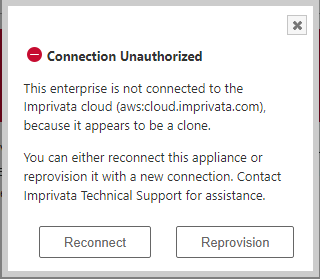
The dialog offers you options to reconnect or reprovision this appliance. Do NOT select either option. Instead, close the Connection Unauthorized dialog if you opened it, and follow the instructions below.
-
Click the gear icon > Cloud connection. The Cloud connection page is displayed.
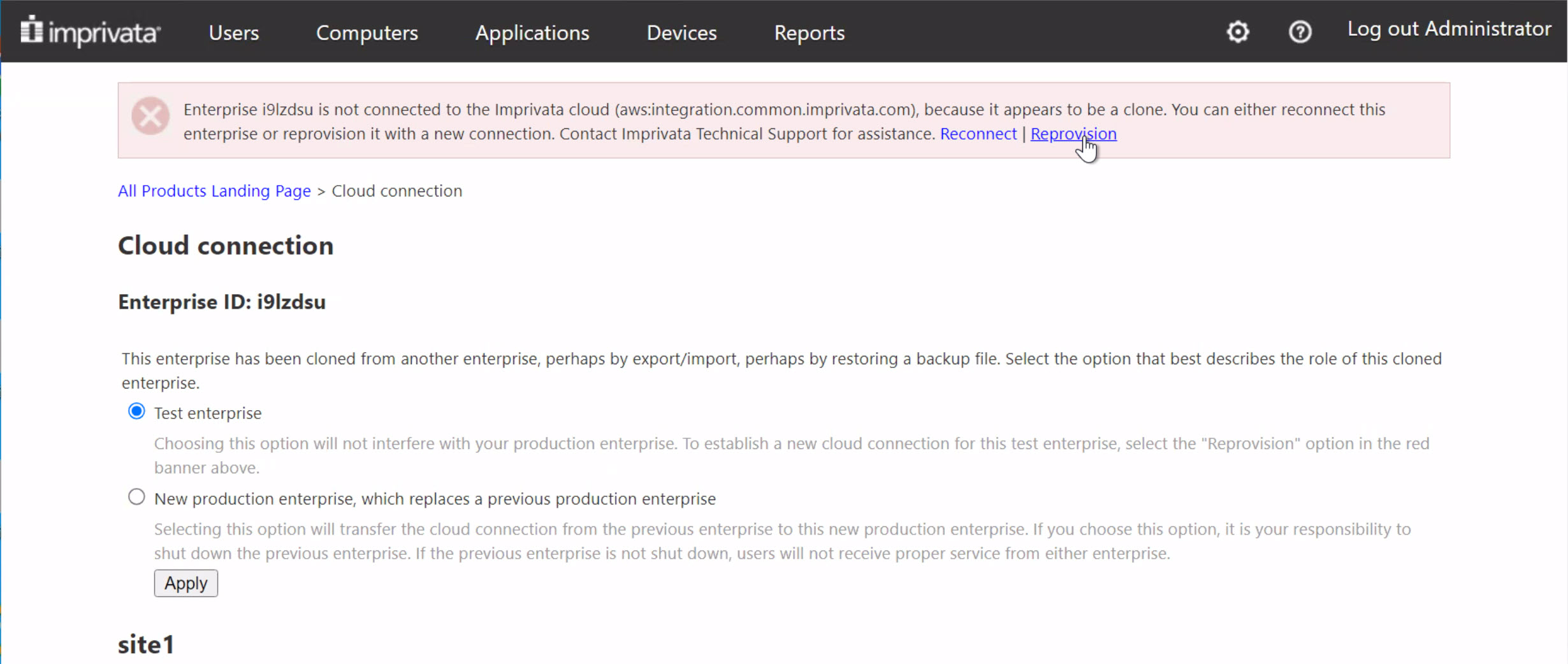
-
Ensure that Test enterprise is selected.
-
Click Reprovision in the red banner on the page, and then click Test Connectivity.
-
Enter the Enterprise ID and cloud provisioning code and then click Establish trust.
If your organization uses WebSSO and Mobile EPCS, you must reconfigure those features for only your new G4 test enterprise so that you can enable and test those features, as mentioned in the IMPORTANT note in the previous section. For information on configuring WebSSO, see "Imprivata Web SSO — SAML 2.0" in the Enterprise Access Management with SSO online help. For information on configuring Mobile EPCS, see "Integrate your EMR Application" and go to the "Epic Haiku and Canto" section, in the Enterprise Access Management with MFA online help.
A cloud provisioning code is valid for 120 days. If you need to continue testing or to have your test enterprise connected to the Imprivata cloud after the code has expired, you must contact Imprivata Support during normal business hours to have a new code issued, and then repeat the procedure above using the new code. If your organization uses WebSSO or Mobile EPCS and you want to continue testing those features, you must reconfigure those features again for only your test enterprise.
After the new cloud connection is established, the options to establish a new cloud connection are no longer displayed. Later in the migration procedure, as you prepare to transition the new G4 enterprise to production, you will import a fresh database backup of your original production enterprise. After that import, the options to establish a new cloud connection will be displayed again.
Establish a New Cloud Connection for a New G4 Production Enterprise
To establish a new connection to the Imprivata Cloud for a new G4 production enterprise:
-
Log into the Imprivata Admin Console as a superadmin.
You need superadmin access to establish the new Imprivata Cloud connection. Otherwise, the options to establish a new connection and related text are not displayed.
CAUTION:The Admin Console home page displays a Imprivata cloud services status box. The box will show the cloud connection as being down (a red circle). If you click Details under Cloud Connection, a Connection Unauthorized dialog appears.
The dialog offers you options to reconnect or reprovision this appliance. Do NOT select either option. Instead, close the Connection Unauthorized dialog if you opened it, and follow the instructions below.
-
Click the gear icon > Cloud connection. The Cloud connection page is displayed.
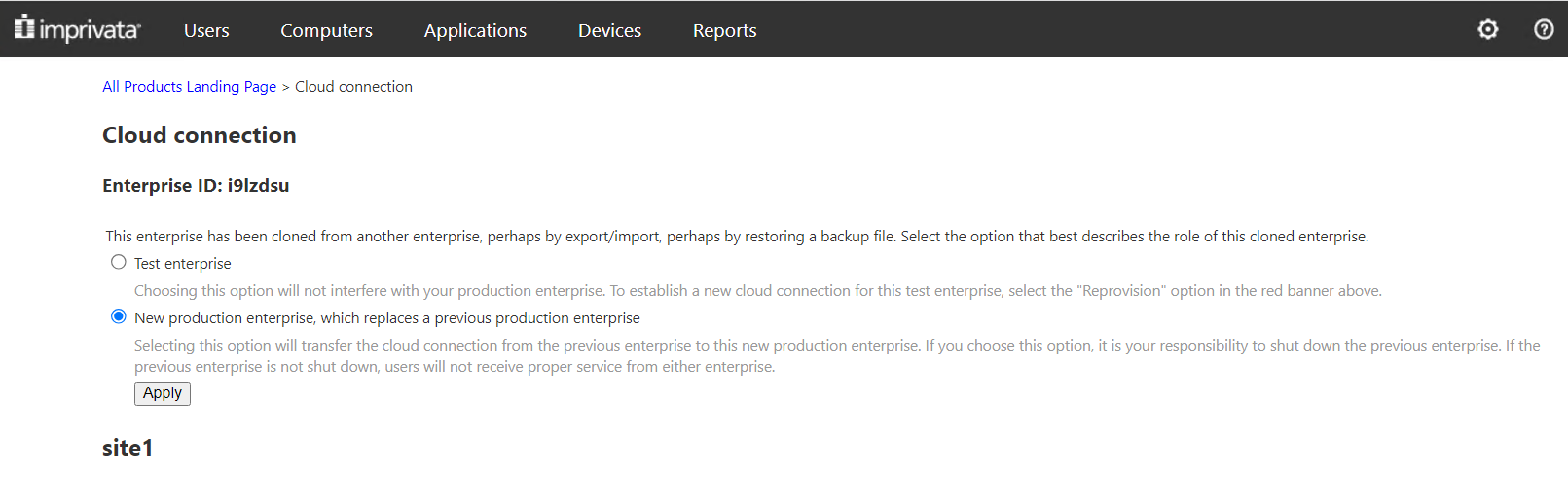
-
Select New production enterprise, which replaces a previous production enterprise.
Note the text under the new enterprise option that says you must shut down the previous enterprise. You will do that in a later section below.
-
Click Apply.
After a few moments, the new Imprivata Cloud connection is established for all appliances in the enterprise. The appliance host status changes to Connected and the red warning banner disappears.
After the new cloud connection is established, the options to establish a new cloud connection are no longer displayed. Later in the migration procedure, as you prepare to transition the new G4 enterprise to production, you will import a fresh database backup of your original production enterprise. After that import, the options to establish a new cloud connection will be displayed again.
Distribute and Install the ProveID Embedded Update
If Imprivata ProveID Embedded is deployed to the enterprise, distribute and install the ProveID Embedded IPM (Imprivata Package Module) for the release you staged on your new G4 appliances.
Confirm ProveID Embedded Upgrade Settings
After the new G4 enterprise is transitioned to production, thin clients are upgraded per their computer policy settings — either on reboot only or when idle or during a reboot.
Ensure that the current settings are as you want them for the upgrade in the computer policies.
Install the ProveID Embedded IPM
To distribute and install the ProveID Embedded update:
-
Log into the Imprivata Appliance Console. Go to the Packages tab.
-
Click Upload Imprivata Package, specify the file, and then click Upload.
-
Click Distribute, and then Send, to copy the IPM to all appliances in the enterprise.
-
Click Done when the distribution is finished.
-
From the Imprivata Appliance Console, select the IPM and click Install. An IPM Information page opens with version and legal information.
-
Leave Install IPM on all appliances selected and click Install.
The update is installed on all appliances.
-
In the Imprivata Admin Console, go to the Computer Policies page, and open the computer policy that is configured for ProveID Embedded.
-
Select the version of the ProveID Embedded IPM that was just uploaded for installation.
Enable Windows Endpoints for a Supported TLS Version
As mentioned in Agent SSL Validation and TLS Support, if your Windows endpoints are not already configured to use TLS 1.3 or 1.2, you may need to reconfigure them to use TLS 1.3 or 1.2 to prevent communication from failing between Imprivata agents and G4 appliances.
If required, configure the following registry settings.
Add the DefaultSecureProtocols Entry to WinHttp
To configure the registry setting:
-
Add the DefaultSecureProtocols value to the WinHttp registry key. The registry key is located at:
32-bit or 64-bit: HKEY_LOCAL_MACHINE\SOFTWARE\Microsoft\Windows\CurrentVersion\Internet Settings\WinHttp
For endpoints on Enterprise Access Management with SSO 7.3 or earlier, the 64-bit location is:
HKEY_LOCAL_MACHINE\SOFTWARE\Wow6432Node\Microsoft\Windows\CurrentVersion\Internet Settings\WinHttp
- Configure DefaultSecureProtocols with a Data Type of DWORD .
- Set the hexadecimal value to support TLS 1.3 or 1.2:
Set no value for TLS 1.3. The setting defaults to the highest available TLS version, currently 1.3.
Set 0x00000800 for TLS 1.2.
Create the DisabledbyDefault Entry
To configure the registry setting:
-
Go to the Protocols registry key. The registry key is located at:
HKEY_LOCAL_MACHINE\SYSTEM\CurrentControlSet\Control\SecurityProviders\SCHANNEL\Protocols
-
Based on the TLS version you want to enable, create one of the following subkeys:
-
TLS 1.3
-
TLS 1.2
-
- Create the Client subkey under the TLS entry.
-
Add the DisabledByDefault value to the Client registry key.
- Configure DisabledbyDefault with a Data Type of DWORD and a value of 0.
Test the New G4 Enterprise
Before you switch the new G4 enterprise to production, redirect a subset of existing Imprivata agents to the new G4 enterprise and conduct testing:
-
Test the new G4 enterprise on all Enterprise Access Management with SSO features and functionality that are in use in the original enterprise.
-
Be sure to include SSO profiles.
Test SSO profiles against the new G4 enterprise using the Imprivata agent version used in the original enterprise, as well as the agent version used in the new G4 enterprise. For more information on installing the Imprivata agent, see "Deploying the Agent" in the Imprivata Online Help.
-
Note and address any issues before switching the enterprise.
The next sections describe how to redirect endpoints to a new G4 appliance.
If your Imprivata agents are enabled for SSL validation, then Windows endpoints must be enabled for TLS 1.3 or 1.2, depending on the agent version. Otherwise, communication fails between Imprivata agents and G4 appliances. For more information, see Agent SSL Validation and TLS Support.
Redirect Some Windows Endpoints to a New G4 Appliance for Testing
An efficient way to redirect a subset of Imprivata agents on Windows endpoints is to manage a registry key change on those endpoints. For each endpoint to be redirected:
-
In the Registry Editor for the endpoint, go to the ISXAgent subkey:
32-bit or 64-bit: HKEY_LOCAL_MACHINE\SOFTWARE\SSOProvider\ISXAgent
For clients on 7.3 and earlier, the 64-bit location is:
HKEY_LOCAL_MACHINE\SOFTWARE\Wow6432Node\SSOProvider\ISXAgent
-
Modify the IPTXPrimServer value to be the FQDN (Fully Qualified Domain Name) of a new G4 appliance, for example, ONESIGN1.yourdomain.name.
NOTE:IPTXPrimServer supports an FQDN, an IP address, and a CNAME record.
-
In File Explorer, navigate to
C:\Windows\system32\drivers\etc\. -
Using Administrator permissions, edit the
hostsfile.Add entries as follows:
TempIPAdd1 HOSTNAME1.FQDN
TempIPAdd1 HOSTNAME1
TempIPAdd2 HOSTNAME2.FQDN
TempIPAdd2 HOSTNAME2
where
-
TempIPAddn represents the temporary IP address of a new G4 appliance.
-
HOSTNAMEn.FQDN represents the FQDN of a new G4 appliance.
Example:
10.1.1.11 ONESIGN1.yourdomain.name
10.1.1.11 ONESIGN1
10.1.1.12 ONESIGN2.yourdomain.name
10.1.1.12 ONESIGN2
-
- Reboot the endpoint.
Redirect Some Linux Endpoints with ProveID Embedded to a New G4 Appliance for Testing
Redirect a subset of Linux endpoints running ProveID Embedded to a new G4 appliance, for each of those endpoints.
HP endpoints
-
Add entries to the endpoint's hosts file
/etc/hoststhat specify host names corresponding to the IP addresses of the new G4 appliances.The IP addresses are either temporary or permanent IP addresses, as explained in Migrating to a G4 Enterprise.
-
Add entries as follows:
TempIPAdd1 HOSTNAME1.FQDN
TempIPAdd1 HOSTNAME1
TempIPAdd2 HOSTNAME2.FQDN
TempIPAdd2 HOSTNAME2
where
-
TempIPAddn represents the temporary IP address of a new G4 appliance.
-
HOSTNAMEn.FQDN represents the FQDN of a new G4 appliance.
Example:
10.1.1.11 ONESIGN1.yourdomain.name
10.1.1.11 ONESIGN1
10.1.1.12 ONESIGN2.yourdomain.name
10.1.1.12 ONESIGN2
-
-
-
Restart the endpoints. This step is recommended but is not required.
When you have finished testing and are ready to transition your new G4 enterprise to production, remove the entries you added to each endpoint's
/etc/hostsfile and optionally restart those endpoints.
IGEL endpoints
-
Log in to the UMS.
-
Create a new Profile or edit an existing one assigned to the IGEL endpoints.
-
Navigate to Network > Hosts.
-
Click the square plus (+) icon at the top right.
-
Add entries for all the G4 appliance temporary IPs, following the example below:
TempIPAdd1 HOSTNAME1.FQDN
TempIPAdd1 HOSTNAME1
TempIPAdd2 HOSTNAME2.FQDN
TempIPAdd2 HOSTNAME2
where
-
TempIPAddn represents the temporary IP address of a new G4 appliance.
-
HOSTNAMEn.FQDN represents the FQDN of a new G4 appliance.
Example:
10.1.1.11 ONESIGN1.yourdomain.name
10.1.1.11 ONESIGN1
10.1.1.12 ONESIGN2.yourdomain.name
10.1.1.12 ONESIGN2
-
-
Click Save and apply at next reboot.
-
Restart the endpoints.
When you have finished testing and are ready to transition your new G4 enterprise to production, remove the entries you added, and restart those endpoints.
Redirect Some ProveID Web Endpoints to a New G4 Appliance for Testing
Devices that utilize ProveID Web API calls are supported by their manufacturer or reseller.
Reach out to the manufacturer or distributor of your ProveID Web endpoints for information about testing during your G4 migration.
Transition the New G4 Enterprise to Production
The following sections detail how to transition your original enterprise to the new G4 enterprise.
Manage the Redirection of Endpoints to Appliances in a New Subnet or on Azure or on a Hybrid Enterprise
As detailed in Appliance IP Address Changes and Agent Connectivity, migrating to a different subnet in a new on premises G4 enterprise, or migrating to a new G4 enterprise on Azure, or migrating a hybrid (mixed on premises and on Azure) G3 enterprise to a hybrid G4 enterprise, requires you to adopt new production IP addresses. You must take additional steps to ensure that Imprivata agents can communicate with a new G4 appliance for the first time and download the new network topology.
The following sections detail three different methods to redirect Imprivata agents. You can use any of the three methods to redirect Windows endpoints. However, to redirect Linux endpoints running Prove ID Embedded, you can use only the DNS entry change method.
Virtual IP Address and Load Balancer
If the Imprivata agent is configured to use the IP address of the appliance, you can use a VIP (Virtual IP address) and a load balancer to redirect Imprivata agents to the new enterprise.
The following are the high-level tasks. Use them as guidance to extrapolate the necessary steps for your environment.
-
Before you begin the migration:
-
Configure a load balancer and VIP between the Imprivata agents and appliances.
-
Configure the VIP to point to the FQDN or IP address of each appliance in the original enterprise.
-
-
Test a subset of your Imprivata agents by:
-
Updating the IPTXPrimServer registry value to the VIP address.
-
Creating the ForcePrimServer registry value. This value forces the Imprivata agent to ignore the current network topology and connect to an appliance through the VIP.
-
Verifying that the Imprivata agents can connect to an appliance and download the network topology.
NOTE:All other Imprivata agents in your enterprise continue to use the existing network topology during this period.
-
-
Before you shut down the appliances in the original enterprise:
- Configure the VIP to point to the FQDN or IP address of each new G4 appliance.
- Configure the remaining Imprivata agents by updating IPTXPrimServer registry value and creating the ForcePrimServer registry value.
After the new G4 enterprise is switched to production, the Imprivata agents fall back to the IPTXPrimServer value to connect to the appliances for the first time and download the new network topology.
If you experience problems while transitioning enterprises, you can recover by updating the VIP to point to the appliances in the original enterprise, shutting down the new G4 enterprise, and restarting all appliances in the original enterprise.
DNS Entry Change
If the Imprivata agent is configured to use the FQDN of the appliance, you can manage a DNS change to redirect Imprivata agents to the new enterprise.
Before shutting down the current enterprise, update the FQDN of each appliance that is being replaced with the new IP address of each new G4 appliance.
The following table details some of the advantages and disadvantages of this method:
| Advantages | Disadvantages |
|---|---|
|
|
If you experience problems while transitioning enterprises, you can recover by reverting the DNS entries back to the original settings, shutting down the new G4 enterprise, and restarting the original enterprise's appliances.
Registry Key Change
The Imprivata agent falls back to the IPTXPrimServer registry value when it does not have the network topology to communicate with any appliance in the enterprise. You can apply a registry key change to redirect Imprivata agents to the new enterprise by:
- Modifying the IPTXPrimServer registry value to the network address of a new G4 appliance.
- Creating the ForcePrimServer registry value. This value forces the Imprivata agent to ignore the current network topology and connect directly to the appliance specified in IPTXPrimServer.
To redirect an Imprivata agent with a registry key change:
-
In the Registry Editor, go to the ISXAgent subkey:
32-bit or 64-bit: HKEY_LOCAL_MACHINE\SOFTWARE\SSOProvider\ISXAgent
-
Modify the IPTXPrimServer value with the network address of a new G4 appliance.
NOTE:IPTXPrimServer supports a fully qualified domain name, an IP address, and a CNAME record.
When entering the network address, append it with or maintain the appended
/sso/servlet/messagerouterExample: https://example.com/sso/servlet/messagerouter
-
Go to the SSOManager subkey:
For agent releases 7.4 and later:
-
HKEY_LOCAL_MACHINE\Software\SSOProvider\SSOManager\
For agent releases earlier than 7.4:
-
64–bit— HKEY_LOCAL_MACHINE\Software\Wow6432Node\SSOProvider\SSOManager\
-
32–bit— HKEY_LOCAL_MACHINE\Software\SSOProvider\SSOManager\
-
-
Add the ForcePrimServer registry value with a Data Type of DWORD and a value of 1.
- Lock the endpoint, and then login.
After the Imprivata agent has connected to the new G4 appliance and downloaded the new network topology, remove the ForcePrimServer registry value to let it follow its load balancing and failover logic.
The following table details some of the advantages and disadvantages of this method:
| Advantages | Disadvantages |
|---|---|
|
|
If you experience problems while transitioning enterprises, you can recover by reverting the IPTXPrimServer value back to the original settings, shutting down the new G4 enterprise, and restarting all appliances in the original enterprise.
Downtime Versus Data Loss
There are two factors to consider when planning the transition of the new G4 enterprise to production:
-
Downtime — Downtime is when users are unable to use any Imprivata OneSign or Imprivata Confirm ID functionality.
-
Data loss — The kind of data that can be lost includes:
-
Captured SSO credentials
-
User enrollments, such as authentication methods, security questions, and proximity cards.
-
A user password change in Active Directory.
-
Any changes an Administrator makes in the Imprivata Admin Console and the Imprivata Appliance Console.
-
Although the process is designed to mitigate both factors, the order in which you complete the respective steps differs depending on which factor is most important to your organization.
The following diagram shows the relevant high-level steps to complete the transition with either no data loss or minimal downtime, including the period of time during which downtime and data loss can occur.
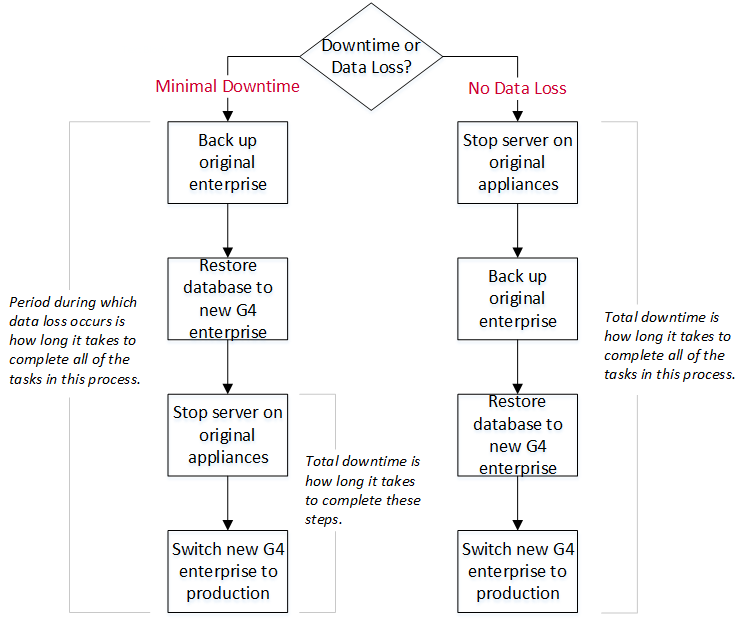
Transition with No Data Loss
The following sections detail how to transition the new G4 enterprise to production without data loss.
Although there is no data loss, the total amount of enterprise downtime is how long it takes to complete all of the tasks in this process. For more information see,
This migration path is the recommended best practice for Enterprise Access Management with MFA EPCS customers.
Archive Audit Records
Archive your audit records before stopping the Imprivata server on the original appliances. Archiving audit records now helps to ensure that your audited data is as up to date as possible before you transition the new G4 appliances to production.
To archive audit records:
-
In the Imprivata Admin Console, go to the gear icon menu > Settings page.
-
Go to the Audit Records section.
-
Go to the Record Maintenance section, select Archive and Delete or Archive only, and specify the minimum age of files to be archived.
NOTE:Although all audit records are archived, regulated audit records that must be retained for a specific period of time are not deleted from the appliance.
-
In Save location, enter the relative path of the location on the file server.
NOTE:If the path is blank for a SCP server, the archived records are saved to the home folder of the account. For example —
/home/<user>. - Click Perform now.
Configure Offline Functionality and Stop the Imprivata Server on the Original Appliances
You can take several steps to help ensure uninterrupted service after you stop the server on each appliance. Although optional, it is recommended that you:
-
Configure offline authentication.
Offline authentication lets a user log into Enterprise Access Management with SSO when the Imprivata agent cannot connect to an appliance.
-
Allow Windows authentication if Enterprise Access Management with SSO authentication fails.
If Enterprise Access Management with SSO functionality fails, this functionality lets users access computers using their Windows domain credentials (user name and password).
-
Allow offline SSO.
Offline SSO gives a user single sign-on access to applications when the Imprivata agent cannot connect to the appliance.
-
There is no offline authentication for signing orders with Enterprise Access Management with MFA. When the Imprivata agent cannot connect to any appliance, providers are unable to sign orders with Enterprise Access Management with MFA.
-
For Enterprise Access Management with MFA medical device workflows, many medical devices do not support users badging into a medical device during the enterprise migration. To determine whether your medical device supports offline mode, review the "Medical Devices" and "Endpoint Device Matrix" sections of the Enterprise Access Management with MFA Supported Components in the Imprivata Environment Reference.
Configure Offline Authentication
To configure offline authentication:
-
In the Imprivata Admin Console, go to the User policies page > Authentication tab > Desktop Access authentication section.
-
Select Allow offline authentication.
-
Click Save.
Not all Imprivata authentication methods and endpoints support offline authentication (offline mode). Imprivata recommends that you verify support before enabling it.
To verify support of offline mode, see the "Authentication Methods" and "Endpoint Device Matrix" sections in the Enterprise Access Management with SSO Supported Components, which is located in the Imprivata Environment Reference.
Allow Offline SSO
SSO remains available to a user, so long as the following conditions are met:
-
The user has successfully authenticated to the endpoint before the Imprivata servers are stopped.
If they typically use more than one endpoint throughout the day, they must have authenticated to each endpoint to maintain uninterrupted access to SSO.
-
Both the endpoint and authentication method support offline authentication.
If either does not support offline authentication, SSO is not available. Its is recommended that you verify support before stopping the Imprivata server on your original appliances. To verify support, see the "Authentication Methods" and "Endpoint Device Matrix" sections in "Enterprise Access Management with SSO Supported Components". You can find this resource in the Imprivata Environment Reference.
To allow offline SSO:
-
In the Imprivata Admin Console, go to the User policies page > Single Sign-On tab.
-
Select Allow offline single sign-on access to applications, and if required, specify a single sign-on data lifespan.
-
Click Save.
Prevent a Challenge for Reauthentication
By default, Imprivata Enterprise Access Management with SSO requires users to reauthenticate when transitioning from offline to online. To prevent the reauthentication challenge:
-
In the Imprivata Admin Console, go to the User policies page > Challenges tab.
-
Go to Always challenge users when transitioning from offline to online? section.
-
Select No, don't challenge.
-
Specify the grace period during which users do not have to reauthenticate.
-
Click Save.
Allow Windows Authentication
To allow Windows authentication:
- In the Imprivata Admin Console, go to the Computer policies page > General tab.
- Go to the Authentication section.
- Select Yes to allow Windows authentication if Imprivata OneSign authentication fails.
Stop the Imprivata Server
Stop the Imprivata server on each appliance in the original production enterprise.
To stop the Imprivata server on an appliance:
- In the Imprivata Appliance Console, click the System tab.
- On the Operations tab, in the Imprivata server section, click Stop/restart options.
- From the task list, select Stop the Imprivata Server on this appliance, and click Go.
Back Up the Original Production Environment
Back up the Imprivata database of your original production environment. You will use the backup to restore the original enterprise to the staged new G4 appliances.
About a Database Backup
Backing up the Imprivata database can take ten minutes or longer, depending on its size. During the backup, users experience no interruption in service. The backup file:
-
Contains the Imprivata database for the entire enterprise — not just a single site.
-
Does not contain configuration data for the enterprise, site, or appliance.
-
Is a compressed file that can be encrypted for increased security. The file name includes a date-time stamp. For example, a file named
20250801_132506.IBUis a backup that was created in the year 2025, on August 1, at 1:25:06 pm.
Manage the Database Backup File
It is best practice to store the Imprivata database backup file in a secure location off the appliance:
-
If you have configured a default file server for the appliance, the backup process automatically saves the backup file to the location.
-
If you have not configured a default file server, the backup process saves the backup file to the appliance. In that case, you should download it to a secure location.
For more information on using the Imprivata Appliance Console to configure a file server, see "Imprivata Network Settings" in the Imprivata Enterprise Access Management Online Help.
Create the Database Backup File
Create the Imprivata database backup file from an Imprivata audit server for a G3 or G2 enterprise, or from a database appliance for a G4 enterprise.
An Administrator or Super Administrator can create the backup file.
To create the backup file:
-
In the Imprivata Appliance Console, go to the Systems page > Operations tab.
-
Click Start Backup.
-
(Optional)—To encrypt the backup file, select Encryption Enabled.
CAUTION:Take note of the password. If you forget the password, you are unable to use this file to restore the database.
-
Click OK. The backup is complete when the Operations page lists the status as SUCCESS. If you have configured a file server, the backup process saves the file to this location.
-
If you have not configured a file server, click Save to download the file. Store it in a secure location.
Restore the Original Enterprise Backup to the New G4 Enterprise
To ensure that the new G4 enterprise is using the latest data at the time of the transition, restore the original enterprise backup to the new G4 environment.
Consider the following:
-
Only a Super Administrator can restore the enterprise.
-
The Super Administrator must initiate the restoration from a new G4 database appliance. The restoration cannot be done from a service appliance.
-
During the restoration:
-
Enterprise Access Management with SSO is stopped only on the new G4 appliance from which the restoration is started. All other new G4 appliances remain online to maintain uninterrupted service.
-
The Imprivata Appliance Console remains available for all online appliances, but you should not use those consoles until restoration is done.
-
The Imprivata Admin Console is unavailable.
-
Your browser might be sluggish. A progress indicator shows how close the restoration is to completion. Allow the restoration to finish.
-
-
When the restoration is done, Imprivata servers, Enterprise Access Management with SSO, and if present, Enterprise Access Management with MFA restart automatically. You do not need to restart the appliance.
To restore the enterprise backup to the new G4 enterprise:
-
In the Imprivata Appliance Console, go to the System page > Operations tab.
- In the Restore section, specify whether the last successful backup should be used or if a different backup file must be uploaded.
Do one of the following:
If the last backup file is being used, click Restore.
Upload the required file, and click Restore.
If the backup file is encrypted, enter the password. The password field appears only if the backup file is encrypted. The encryption password is specific to the backup file and is independent of the Imprivata Admin Console password.
-
Click OK.
You do not have to restart the appliance after the restoration is done.
Export the G4 Enterprise's Certificates for Epic Hyperdrive
For customers migrating an enterprise from G3 to G4 and using Epic Hyperdrive, after restoring the G3 production database to the G4 enterprise, you must download the Hyperdrive certificate(s) from the Imprivata Admin Console. You then must send the certificate(s) to Imprivata to have Imprivata upload them into Epic’s Connection Hub. This is required because the certificates on the migrated G4 appliances may have been overwritten by the certificates from the original G3 enterprise.
To export the Epic Hyperdrive certificates from a G4 enterprise:
-
From the Imprivata Admin Console Settings page (gear icon > Settings), export the Subspace certificates for Epic environments.
Click Download certificate for production environments.
-
Provide the certificates to your Imprivata Customer Success Manager for upload to Epic’s Connection Hub.
Upload the G4 License Again
Although you uploaded a valid G4 license to create the new G4 enterprise, restoring the original enterprise backup replaces that license with the license from your original production enterprise. As a result, you must upload the G4 license again.
To upload a license:
- In the Imprivata Admin Console, open the gear icon menu, and click License.
- Click Upload a new license.
Unblock the New G4 Appliances' Connections with DigiCert
This section applies only if your organization uses individual identity proofing with DigiCert for Imprivata Confirm ID for Electronic Prescription of Controlled Substances (EPCS). If your organization does not use individual identity proofing with DigiCert, skip this section.
In the next section below, you will reestablish an Imprivata Cloud connection to your new G4 production enterprise. Before doing that, you must unblock each new G4 appliance's connections with DigiCert in your new G4 enterprise.
To unblock a G4 appliance's connections with DigiCert:
-
Log into the Imprivata Admin Console for that appliance.
-
Go to Network > Name Resolution > Local Host Entries.
-
Delete each of the three local host entries that you previously added: api.digicert.com, www.digicert.com, and ocsp.digicert.com, each having IP address 127.0.0.1.
Repeat this process for each of your new G4 appliances in your new enterprise.
Reestablish a Cloud Connection
This section applies only if your organization has enabled one or more features that use an Imprivata Cloud connection. If your organization has not enabled any of the features listed below, you can skip this section.
Features that use an Imprivata Cloud connection are:
-
Identity proofing with DigiCert
-
Imprivata Confirm ID Remote Access with the Imprivata Cloud
-
Web Single Sign-On (Web SSO)
-
Electronic Prescription of Controlled Substances (EPCS) on a mobile device (Mobile EPCS)
After you restore the original enterprise backup to your new G4 enterprise, you must reestablish the Imprivata Cloud connection. The procedure is described in the sub-section below.
Establish a New Cloud Connection for a New G4 Production Enterprise
To establish a new connection to the Imprivata Cloud for a new G4 production enterprise:
-
Log into the Imprivata Admin Console as a superadmin.
You need superadmin access to establish the new Imprivata Cloud connection. Otherwise, the options to establish a new connection and related text are not displayed.
CAUTION:The Admin Console home page displays a Imprivata cloud services status box. The box will show the cloud connection as being down (a red circle). If you click Details under Cloud Connection, a Connection Unauthorized dialog appears.
The dialog offers you options to reconnect or reprovision this appliance. Do NOT select either option. Instead, close the Connection Unauthorized dialog if you opened it, and follow the instructions below.
-
Click the gear icon > Cloud connection. The Cloud connection page is displayed.
-
Select New production enterprise, which replaces a previous production enterprise.
Note the text under the new enterprise option that says you must shut down the previous enterprise. You will do that in a later section below.
-
Click Apply.
After a few moments, the new Imprivata Cloud connection is established for all appliances in the enterprise. The appliance host status changes to Connected and the red warning banner disappears.
Shut Down the Original Appliances and Switch the New G4 Appliances to Production
Shut Down the Original Appliances
Shut down each appliance in the original production enterprise.
To shut down an appliance:
- In the Imprivata Appliance Console, click the System tab.
- On the Operations tab, in the Appliance Operations section, click Reboot/shutdown options.
- From the task list, select Shutdown this appliance, and click Go.
Switch the New G4 Enterprise to Production
If you are migrating to a new G4 on-premises enterprise on a new subnet, or if you are migrating to a new G4 enterprise on Azure, or if you are migrating a hybrid (on premises and on Azure) G3 enterprise to a hybrid G4 enterprise, then you should not perform this step.
A switch to production should only be done on a database appliance; do not attempt it on a service appliance.
Switching the new G4 enterprise to production automatically switches the IP addresses of the new G4 appliances to the original IP addresses of the appliances they are replacing.
To switch the new G4 enterprise to production:
-
In the Imprivata Appliance Console of a new G4 database appliance in the new G4 enterprise, click the Network tab.
-
Select Switch on All, and click Switch IP.
Transition with Minimal Downtime
The following sections detail how to transition the G4 enterprise to production with minimal downtime.
Although there is minimal enterprise downtime, the period during which data loss occurs is how long it takes to complete all of the tasks in this process.
Archive Audit Records
Archive your audit records before stopping the Imprivata server on the original appliances. Archiving audit records now helps to ensure that your audited data is as up to date as possible before you transition the new G4 appliances to production. Archiving and deleting older records reduces the time needed to create the original enterprise database backup and to restore it to the new G4 enterprise.
To archive audit records:
-
In the Imprivata Admin Console, go to the gear icon menu > Settings page.
-
Go to the Audit Records section.
-
Go to the Record Maintenance section, select Archive and Delete or Archive only, and specify the minimum age of files to be archived.
NOTE:Although all audit records are archived, regulated audit records that must be retained for a specific period of time are not deleted from the appliance.
-
In Save location, enter the relative path of the location on the file server.
NOTE:If the path is blank for a SCP server, the archived records are saved to the home folder of the account. For example —
/home/<user>. - Click Perform now.
Back Up the Original Production Environment
Back up the Imprivata database of the original production environment. You will use the backup to restore the enterprise to the staged new G4 appliances.
About a Database Backup
Backing up the Imprivata database can take ten minutes or longer, depending on its size. During the backup, users experience no interruption in service. The backup file:
-
Contains the Imprivata database for the entire enterprise — not just a single site.
-
Does not contain configuration data for the enterprise, site, or appliance.
-
Is a compressed file that can be encrypted for increased security. The file name includes a date-time stamp. For example, a file named
20250801_132506.IBUis a backup that was created in the year 2025, on August 1, at 1:25:06 pm.
Manage the Database Backup File
It is best practice to store the Imprivata database backup file in a secure location off the appliance:
-
If you have configured a default file server for the appliance, the backup process automatically saves the backup file to the location.
-
If you have not configured a default file server, the backup process saves the backup file to the appliance. In that case, you should download it to a secure location.
For more information on using the Imprivata Appliance Console to configure a file server, see "Imprivata Network Settings" in the Imprivata Enterprise Access Management Online Help.
Create the Database Backup File
Create the Imprivata database backup file from an Imprivata audit server for a G3 or G2 enterprise, or from a database appliance for a G4 enterprise.
An Administrator or Super Administrator can create the backup file.
To create the backup file:
-
In the Imprivata Appliance Console, go to the Systems page > Operations tab.
-
Click Start Backup.
-
(Optional)—To encrypt the backup file, select Encryption Enabled.
CAUTION:Take note of the password. If you forget the password, you are unable to use this file to restore the database.
-
Click OK. The backup is complete when the Operations page lists the status as SUCCESS. If you have configured a file server, the backup process saves the file to this location.
-
If you have not configured a file server, click Save to download the file. Store it in a secure location.
Restore the Original Enterprise Backup to the New G4 Enterprise
To ensure that the new G4 enterprise is using the latest data at the time of the transition, restore the original enterprise backup to the new G4 environment.
Consider the following:
-
Only a Super Administrator can restore the enterprise.
-
The Super Administrator must initiate the restoration from a new G4 database appliance. The restoration cannot be done from a service appliance.
-
During the restoration:
-
Enterprise Access Management with SSO is stopped only on the new G4 appliance from which the restoration is started. All other new G4 appliances remain online to maintain uninterrupted service.
-
The Imprivata Appliance Console remains available for all online appliances, but you should not use those consoles until restoration is done.
-
The Imprivata Admin Console is unavailable.
-
Your browser might be sluggish. A progress indicator shows how close the restoration is to completion. Allow the restoration to finish.
-
-
When the restoration is done, Imprivata servers, Enterprise Access Management with SSO, and if present, Enterprise Access Management with MFA restart automatically. You do not need to restart the appliance.
To restore the G3 or G2 enterprise backup to the G4 enterprise:
-
In the Imprivata Appliance Console, go to the System page > Operations tab.
- In the Restore section, specify whether the last successful backup should be used or if a different backup file must be uploaded.
Do one of the following:
If the last backup file is being used, click Restore.
Upload the required file, and click Restore.
If the backup file is encrypted, enter the password. The password field appears only if the backup file is encrypted. The encryption password is specific to the backup file and is independent of the Imprivata Admin Console password.
-
Click OK.
You do not have to restart the appliance after the restoration is done.
Export the G4 Enterprise's Certificates for Epic Hyperdrive
For customers migrating an enterprise from G3 to G4 and using Epic Hyperdrive, after restoring the G3 production database to the G4 enterprise, you must download the Hyperdrive certificate(s) from the Imprivata Admin Console. You then must send the certificate(s) to Imprivata to have Imprivata upload them into Epic’s Connection Hub. This is required because the certificates on the migrated G4 appliances may have been overwritten by the certificates from the original G3 enterprise.
To export the Epic Hyperdrive certificates from a G4 enterprise:
-
From the Imprivata Admin Console Settings page (gear icon > Settings), export the Subspace certificates for Epic environments.
Click Download certificate for production environments.
-
Provide the certificates to your Imprivata Customer Success Manager for upload to Epic’s Connection Hub.
Upload the G4 License Again
Although you uploaded a valid G4 license to create the new G4 enterprise, restoring the original enterprise backup replaces the G4 license with the license from your original production enterprise. As a result, you must upload the G4 license again.
To upload a license:
- In the Imprivata Admin Console, open the gear icon menu, and click License.
- Click Upload a new license.
Unblock the New G4 Appliances' Connections with DigiCert
This section applies only if your organization uses individual identity proofing with DigiCert for Imprivata Confirm ID for Electronic Prescription of Controlled Substances (EPCS). If your organization does not use individual identity proofing with DigiCert, skip this section.
In the next section below, you will reestablish an Imprivata Cloud connection to your new G4 production enterprise. Before doing that, you must unblock each new G4 appliance's connections with DigiCert in your new G4 enterprise.
To unblock a G4 appliance's connections with DigiCert:
-
Log into the Imprivata Admin Console for that appliance.
-
Go to Network > Name Resolution > Local Host Entries.
-
Delete each of the three local host entries that you previously added: api.digicert.com, www.digicert.com, and ocsp.digicert.com, each having IP address 127.0.0.1.
Repeat this process for each of your new G4 appliances in your new enterprise.
Re-establish a Cloud Connection
This section applies only if your organization has enabled one or more features that use an Imprivata Cloud connection. If your organization has not enabled any of the features listed below, you can skip this section.
Features that use an Imprivata Cloud connection are:
-
Identity proofing with DigiCert
-
Imprivata Confirm ID Remote Access with the Imprivata Cloud
-
Web Single Sign-On (Web SSO)
-
Electronic Prescription of Controlled Substances (EPCS) on a mobile device (Mobile EPCS)
After you restore the original enterprise backup to your new G4 enterprise, you must reestablish the Imprivata Cloud connection. The procedure is described in the sub-section below.
Establish a New Cloud Connection for a New G4 Production Enterprise
To establish a new connection to the Imprivata Cloud for a new G4 production enterprise:
-
Log into the Imprivata Admin Console as a superadmin.
You need superadmin access to establish the new Imprivata Cloud connection. Otherwise, the options to establish a new connection and related text are not displayed.
CAUTION:The Admin Console home page displays a Imprivata cloud services status box. The box will show the cloud connection as being down (a red circle). If you click Details under Cloud Connection, a Connection Unauthorized dialog appears.
The dialog offers you options to reconnect or reprovision this appliance. Do NOT select either option. Instead, close the Connection Unauthorized dialog if you opened it, and follow the instructions below.
-
Click the gear icon > Cloud connection. The Cloud connection page is displayed.
-
Select New production enterprise, which replaces a previous production enterprise.
Note the text under the new enterprise option that says you must shut down the previous enterprise. You will do that in a later section below.
-
Click Apply.
After a few moments, the new Imprivata Cloud connection is established for all appliances in the enterprise. The appliance host status changes to Connected and the red warning banner disappears.
Configure Offline Functionality and Stop the Imprivata Server on the Original Appliances
You can take several steps to help ensure uninterrupted service after the server on each appliance is stopped. Although optional, it is recommended that you:
-
Configure offline authentication.
Offline authentication lets a user to log into Enterprise Access Management with SSO when the Imprivata agent cannot connect to an appliance.
-
Allow Windows authentication if Enterprise Access Management with SSO authentication fails.
If Enterprise Access Management functionality fails, this functionality lets users access computers using their Windows domain credentials (user name and password).
-
Allow offline SSO.
Offline SSO gives a user single sign-on access to applications when the Imprivata agent cannot connect to the appliance.
-
There is no offline authentication for signing orders with Enterprise Access Management with MFA. When the Imprivata agent cannot connect to any appliance, providers are unable to sign orders with Enterprise Access Management with MFA.
-
For Enterprise Access Management with MFA medical device workflows, many medical devices do not support users badging into a medical device during the enterprise migration. To determine whether your medical device supports offline mode, review the "Medical Devices" and "Endpoint Device Matrix" sections of the Enterprise Access Management with MFA Supported Components in the Imprivata Environment Reference.
Configure Offline Authentication
To configure offline authentication:
-
In the Imprivata Admin Console, go to the User policies page > Authentication tab > Desktop Access authentication section.
-
Select Allow offline authentication.
-
Click Save.
Not all Imprivata authentication methods and endpoints support offline authentication (offline mode). Imprivata recommends that you verify support before enabling it.
To verify support of offline mode, see the "Authentication Methods" and "Endpoint Device Matrix" sections in the Enterprise Access Management with SSO Supported Components, which is located in the Imprivata Environment Reference.
Allow Offline SSO
SSO remains available to a user, so long as the following conditions are met:
-
The user has successfully authenticated to the endpoint before the Imprivata servers are stopped.
If they typically use more than one endpoint throughout the day, they must have authenticated to each endpoint to maintain uninterrupted access to SSO.
-
Both the endpoint and authentication method support offline authentication.
If either does not support offline authentication, SSO is not available. Its is recommended that you verify support before stopping the Imprivata server on your original appliances. To verify support, see the "Authentication Methods" and "Endpoint Device Matrix" sections in "Enterprise Access Management with SSO Supported Components". You can find this resource in the Imprivata Environment Reference.
To allow offline SSO:
-
In the Imprivata Admin Console, go to the User policies page > Single Sign-On tab.
-
Select Allow offline single sign-on access to applications, and if required, specify a single sign-on data lifespan.
-
Click Save.
Prevent a Challenge for Reauthentication
By default, Imprivata Enterprise Access Management with SSO requires users to reauthenticate when transitioning from offline to online. To prevent the reauthentication challenge:
-
In the Imprivata Admin Console, go to the User policies page > Challenges tab.
-
Go to Always challenge users when transitioning from offline to online? section.
-
Select No, don't challenge.
-
Specify the grace period during which users do not have to reauthenticate.
-
Click Save.
Allow Windows Authentication
To allow Windows authentication:
- In the Imprivata Admin Console, go to the Computer policies page > General tab.
- Go to the Authentication section.
- Select Yes to allow Windows authentication if Imprivata OneSign authentication fails.
Stop the Imprivata Server
Stop the Imprivata server on each appliance in the original production enterprise.
To stop the Imprivata server on an appliance:
- In the Imprivata Appliance Console, click the System tab.
- On the Operations tab, in the Imprivata server section, click Stop/restart options.
- From the task list, select Stop the Imprivata Server on this appliance, and click Go.
Shut Down the Original Appliances and Switch the New G4 Appliances to Production
Shut Down the Original Appliances
Shut down each appliance in the original production enterprise.
To shut down an appliance:
- In the Imprivata Appliance Console, click the System tab.
- On the Operations tab, in the Appliance Operations section, click Reboot/shutdown options.
- From the task list, select Shutdown this appliance, and click Go.
Switch the New G4 Enterprise to Production
If you are migrating to a new G4 on-premises enterprise on a new subnet, or if you are migrating to a new G4 enterprise on Azure, or if you are migrating a hybrid (on premises and on Azure) G3 enterprise to a hybrid G4 enterprise, then you should not perform this step.
A switch to production should only be done on a database appliance; do not attempt it on a service appliance.
Switching the new G4 enterprise to production automatically switches the IP addresses of the new G4 appliances to the original IP addresses of the appliances they are replacing.
To switch the new G4 enterprise to production:
-
In the Imprivata Appliance Console of a new G4 database appliance in the new G4 enterprise, click the Network tab.
-
Select Switch on All, and click Switch IP.
Next Steps and Best Practices
After your Imprivata enterprise migration is complete, perform the following tasks:
Upgrade Imprivata Agents
After you complete the migration of your enterprise to G4, upgrade the Imprivata agents in your enterprise to a maintained release.
Review Supporting Documentation
Review the following documentation available on the Product Downloads page for the OneSign and Confirm ID release:
-
Release Notes — for new and improved features and technology updates.
-
Fixed Issues List — for the latest hotfix in the release. Includes information on server and client fixes.
-
Supported Components - for the supported configurations and endpoint types for your environment. See the Imprivata Environment Reference portal.
Familiarize yourself with the requirements, new features and enhancements, and other information associated with the agent release to which you are upgrading the endpoints.
Appliance and Agent Compatibility
-
The Imprivata appliance release is backwards compatible with older agent releases.
-
For configurations that include endpoints connecting to a Citrix server, the following agent compatibility is expected:
-
Citrix server agents are backward compatible with older endpoint agents.
-
When upgrading an environment containing Citrix, the required upgrade order is:
-
Appliances
-
Citrix agent
-
Endpoint agents
-
-
Run a report to identify the Imprivata agent releases installed on your endpoints.
To run the report, in the Imprivata Admin Console, click Reports > Agent deployment report.
What to Expect
Consider the following information when upgrading Imprivata agents:
-
Endpoints require a restart after upgrading the Imprivata agent software.
IMPORTANT:Depending on your environment, you may need to carefully schedule Imprivata agent upgrades, because of the requirement to restart the endpoints.
Next Steps
There are two ways to update Imprivata agents:
-
If Imprivata agents are set to automatically update, they do so at the next refresh interval after the appliance is upgraded.
To verify this setting in the Imprivata Admin Console, go to the Agent Upgrades section on the General tab of the computer policy (Computers > Computer policies).
-
If Imprivata agents are not set to automatically update, you must push the appropriate MSI file.
To locate the agent MSI files in the Imprivata Admin Console, go to the Deploy agents page (Computers > Deploy agents).


