 minute read
What's New in Imprivata Enterprise Access Management 26.3
Imprivata Enterprise Access Management 26.3 contains the following new features and technology updates.
New Features
 Identity Verification from ServiceNow
The Verify Identity feature already supports an authentication workflow within the Imprivata Admin Console. Now this feature also supports an authentication workflow within the ServiceNow app, when your IT service desk must confirm a caller's identity before providing support. This protects against social engineering attacks where a bad actor impersonates a legitimate user.
Identity Verification from EpicCare Link
The Verify Identity feature already supports an authentication workflow within the Imprivata Admin Console. Now this feature also supports an authentication workflow within EpicCare Link. This protects against social engineering attacks where a bad actor impersonates a legitimate user.
Identity Verification — Custom Connection
Imprivataallows an administrator to create OpenID Connect (OIDC) connections with EpicCare Link or ServiceNow to consume Imprivata Identity Verification (IDV) results.
Every setting behind those templates (which identity data is released, how the connecting system authenticates, and how strict the identity check is) is fixed by Imprivata.
The Custom identity verification template uses the same create/list/edit screens as the existing templates, but the administrator picks the identity data, the authentication method, and the verification strictness. This lets an administrator connect a system that doesn't match either preset (for example, an HR or applicant-tracking system).
Local OpenID Connect
Imprivata Web SSO with a locally hosted OpenID Connect-enabled app is supported. In the event of a cyber event or ISP outage, the Web SSO application profile keeps the local EAM workflow available by issuing the Web SSO token locally.
This profile supports seamless OIDC-based Web SSO on Windows, using the Imprivata agent.
MFA for the Admin Consoles
Multi-Factor authentication to the Imprivata Admin Console and Imprivata Appliance Console is now supported with username, OneSpan (VASCO) token passcode, and password/PIN.
Device Trust
Device Trust enables the appliance to verify that requests come from a specific, previously registered endpoint. Administrators can configure registration tokens, choose whether to enforce Device Trust, and revoke trust for individual devices or an entire integration. The feature supports ProveID Web workstations and mobile devices, as well as Windows and macOS agents.
Non-Disruptive Updates for Windows Agents
Administrators can deploy updates for the Imprivata agent for Windows to selected computer policies and schedule installation by date, local time window, and workstation lock duration. Supported agents download and verify updates in the background, then install when the configured conditions are met. The deployment coordinates sign-outs for single-user and shared workstations; on Citrix and multi-session hosts, it waits for sessions to end naturally. Non-Disruptive Updates require the Imprivata agent for Windows 26.3 or later.
Updated Connector for Epic Hyperdrive settings
Deprecated settings have been removed from the Computer Policy > Connector for Epic tab, and new Connector settings are now available.
User Account settings can now be configured at the enterprise level in Settings.
Clinical Workflows via OIDC for Epic Hyperdrive
Epic Clinical Workflows can now use OpenID Connect (OIDC) for re-authentication through Epic Hyperdrive, including facial authentication.
New authentication UI for Epic-Only workflow
EAM now uses a new authentication UI for Epic-Only workflows. The new experience provides additional features and security improvements while maintaining the look and feel of Desktop Authentication.
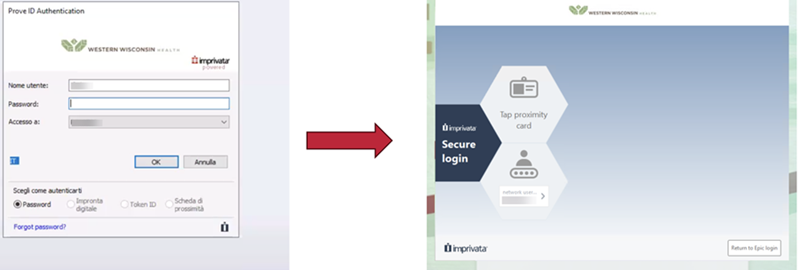
The legacy Classic UI is no longer available. Before upgrade users should be notified of the UI change.
Imprivata recommends updating to Connector for Epic Hyperdrive 26.9 or later.
Epic is a registered trademark of Epic Systems, Inc.
Use Directory Email Address as Username in Profiled Applications
Administrators can now select a user's Active Directory email attribute as the username when configuring an application profile, in addition to the existing UPN and username options. This is particularly useful in environments where the UPN does not match the application's expected username format, but the email address does — enabling seamless single sign-on for those users without manual credential entry.
eIDAS Substantial Enforcement Extended to Additional Authentication Workflows
Imprivata Enterprise Access Management now allows enforcement of eIDAS Substantial-level supervised enrollment across additional authentication workflows, closing a coverage gap that previously limited enforcement to desktop access. Organizations subject to eIDAS Substantial compliance requirements can now apply consistent enrollment enforcement across the following workflows:
-
Clinical
-
Web SSO
-
Medical Devices
Appliance Web Authentication Password Enhancements
The Imprivata appliance now enforces stronger password requirements for local administrator accounts, raising the minimum password length to 15 alphanumeric characters with support for uppercase, lowercase, numbers, and special characters.
When an administrator changes their password, all active sessions are immediately invalidated and re-authentication with the new credentials is required before console access is restored.
These changes strengthen the security foundation of Imprivata appliances and align local account management with current password security best practices.
Citrix Workspace App for Windows 64-bit Support
The Imprivata agent now supports the Citrix Workspace App for Windows 64-bit architecture, enabling administrators to upgrade from 32-bit to 64-bit Citrix Workspace App without disrupting Imprivata functionality.
This release addresses Citrix's deprecation of 32-bit Workspace App and ensures continued compatibility as Citrix transitions to 64-bit-only architecture.Administrators can upgrade endpoints from 32-bit to 64-bit Citrix Workspace App without reinstalling the Imprivata agent or reconfiguring Citrix integration settings.
This release continues to support both 32-bit and 64-bit Citrix Workspace App, providing flexibility during the transition period.
Updated Tab Name: Workspace Access
The Virtual Desktop tab in the Admin Console is now named Workspace Access. The new name appears in both locations:
-
Users > User Policy
-
Computers > Computer policies
Only the tab name changes, and its settings and behavior stay the same.
Support for Omnissa Horizon Cloud Next-Gen (Windows)
This release adds support for Omnissa Horizon Cloud Next-Gen, including published desktop and application workflows.
Organizations moving from on-premises Omnissa Horizon to Horizon Cloud Next-Gen can keep the same authentication and security policies they use today, which helps reduce infrastructure costs.
Ecosystem Integrations and Qualifications
Secure Workspace Access - Thin Clients
Citrix UniconOS
Imprivata VDI Policy Support on UniconOS
UniconOS introduces support for Imprivata Secure Workspace Access (SWA) VDI Computer, User, and Broker policies for Citrix environments, enabling centralized configuration of virtual desktop and application launch, resource selection, and session behavior. This simplifies administration and delivers consistent, policy-driven clinical workflows across shared workstations.
Seamless Web SSO for Google Chrome on UniconOS
UniconOS introduces support for Imprivata Seamless Web SSO in Google Chrome, enabling users authenticated through Imprivata to automatically sign in to supported web applications when they launch Chrome. This extends single sign-on to browser-based clinical applications, reducing repetitive authentication steps and streamlining access on shared workstations.
Fast User Switching in Kiosk Mode on UniconOS
UniconOS expands support for Imprivata Fast User Switching (FUS) to kiosk mode, allowing clinicians to switch between authenticated users on shared workstations without restarting the endpoint. This extends Imprivata's shared-workstation capabilities to additional deployment configurations, helping streamline clinician transitions and improve access to clinical applications.
Dell ThinOS
Seamless Web SSO for Google Chrome on Dell ThinOS
Dell ThinOS 2609 introduces Imprivata Seamless Web SSO support for Google Chrome, enabling users authenticated through Imprivata to automatically sign in to supported web applications. This reduces repetitive logins and streamlines access to browser-based clinical applications on shared workstations.
Fingerprint-Based User Switching on Dell ThinOS
Dell ThinOS 2609 introduces fingerprint-based user switching at the Imprivata lock screen, allowing clinicians to authenticate with their enrolled fingerprint and automatically switch users. Depending on configuration, existing virtual desktop sessions can be reconnected or new sessions launched, enabling faster transitions between clinicians on shared workstations.
IGEL Agent for Imprivata
Imprivata Appliance Load Balancing and Failover on IGEL OS
IAFI 1.7.0 introduces support for Imprivata appliance load balancing and automatic failover, using configured Imprivata Enterprise policies to distribute connections across appliances and automatically reconnect to an available appliance if one becomes unavailable. This improves authentication service availability and resilience for clinical workstations.
Microsoft RDS RemoteApp Support on IGEL OS
IAFI 1.7.0 introduces support for Microsoft RDS RemoteApp roaming workflows, allowing clinicians to automatically launch or manually access published Windows applications using Imprivata authentication and single sign-on. This expands application delivery options and simplifies access to centrally hosted clinical applications on IGEL endpoints.
For more information on specific readers and OS versions, see the EAM Supported Components.
Electronic Medical Records
Dedalus ORBIS (DACH)
Fast User Switching within VDI Sessions in Dedalus ORBIS
Imprivata now supports fast user switching for Dedalus ORBIS within virtual desktop sessions (Citrix/RDS), for the DACH-localized version of ORBIS. This allows clinicians to switch users inside a VDI session without re-establishing their desktop connection, reducing the handoff time on shared workstations.
Technology Updates
Qualifications and Certifications
For more information on new 26.3 qualifications and certifications, see Imprivata Enterprise Access Management Supported Components.
Individual Identity Proofing
Imprivata EAM 26.3 introduces Imprivata Individual Identity proofing, in advance of DigiCert End Of Support.
The new Imprivata ID proofing workflow involves the clinician taking a clear photo of the front and back of their government ID, and a clear photo of their face.
The Imprivata agent must also be updated to EAM 26.3 to complete ID proofing. Clinicians can still authenticate for EPCS at Imprivata agents 26.2 and earlier. Only identity proofing is unsupported.
Imprivata Enterprise Access Management support for Individual identity proofing with DigiCert ends July 31, 2027. After July 31, your DigiCert license cannot be renewed.
Update to Imprivata Individual Identity Proofing before July 31. After the update, clinicians already proofed with DigiCert keep their status and don't need to be proofed again.
If your DigiCert certificate expires before updating the service, clinicians identity proofed with DigiCert cannot complete EPCS workflows.
Risk-Based Access for ProveID Web Clients
Risk-Based Access workflows are supported on thin clients and mobile devices that connect to the Imprivata appliance via the ProveID Web API. Risk Based Authentication for these connections is turned on and configured in the same place, and using the same options, as Risk Based Access for any other sign-in workflow.
Risk-Based Access for Service Desk Verification
Risk-Based Access is now available for Service Desk Verification workflows.
Service Desk Verification
You enterprise's service desk can now send users either an email or a SMS message to initiate the Service Desk Verification workflow.
Face Recognition Improvements
Onscreen Camera Preview
The Imprivata Hub provides controls over the onscreen camera preview during Face Recognition:
-
Camera preview is on during authentication;
-
Camera preview does not appear during authentication;
-
Camera preview does not appear during authentication, but can be turned on by the user for troubleshooting.
Face as a Single Factor
When a user logs back into the desktop within the grace period, no username or second factor may be required. The user may only need to show their face to enter.
Store Enrollment Photos
The administrator can now turn off storage of Face Recognition enrollment photos.
Additional Updates
-
Users who are prompted to consent to Face Recognition, and choose not to consent, will not be prompted to enroll their face again.
-
A new message is presented to the user when Face Recognition is locked, enabling them to proceed with another available authentication method.
-
A new message is presented when a user whose account has been locked attempts to enroll their face at the enrollment utility.
-
Face Recognition has been enabled when Transparent Screen Lock is enabled.
-
The Login Activity report now includes successful sign-ins with face + security key that were previously missing.
-
An error where a user is prompted to enroll their face even when no camera is present on the computer has been fixed.
-
An error where the face camera view fails to appear has been fixed.
-
An error where the user tapped their proximity card while the Face Recognition window is open has been fixed.
-
An error where the camera preview window appears behind a Windows dialog box has been fixed.
-
An error where a false Face Recognition error message appeared when the computer wakes from sleep has been fixed.
Self-Service Password Reset
The Imprivata Self-Service Password Reset application has been updated with a design that aligns with the interface users are familiar with from Web SSO authentications. The authentication methods required before resetting a user password can include face biometric, SMS, email, Imprivata ID, and Imprivata PIN. This updated feature is not available for the Imprivata agent on thin clients. The legacy application that enables self-service password reset with security questions is still available when the new feature is not enabled. See Self-Service Password Reset.
PIN Authentication Method Improvement
EAM will not display PIN as an authentication factor if hardware required by the primary factor is missing - for example, a proximity card reader, if proximity card is the primary method. This eliminates a source of potential user confusion.
Proximity Card Support in Remote Access, Web SSO, Risk-Based Access
Proximity card authentication is now available in the following workflows:
-
Remote Access
-
Web SSO
-
Risk-Based Access
-
Second factor only (external MFA with Entra ID as the first factor)
Deprecation of Internet Explorer and IE Mode
This is a reminder that Internet Explorer is not supported. Any functionality related to Internet Explorer or IE mode will be deprecated as of December 2026.
Microsoft 2020 LDAP Channel Binding and LDAP Signing Updates
While Microsoft has not announced a release date for their planned update to LDAP channel binding and LDAP signing requirements, it is recommended that Imprivata administrators verify that their Imprivata directory (domain) connections are configured for SSL. When the update is applied, any directory connection that is not configured for SSL may fail.
To verify the connection settings, go to the Directories page (Users menu > Directories) and open the required domain. Verify that Use TLS for secure communication is selected.
Imprivata Google Chrome Extension
The Imprivata agent continues to install the Chrome extension for SSO, but no longer enables it.
If you plan on installing Imprivata agents on new endpoints or upgrading existing Imprivata agents, you must enable/allow the extension using a Microsoft Active Directory GPO. Accprding to the Chrome Safe Browsing Policy, a GPO is the only supported way to enable extensions silently.
NOTE: For complete details on enabling the Chrome extension, see "Support for Applications that Run in Google Chrome" in the Imprivata Enterprise Access Management help
Microsoft Deprecation of VBScript
Microsoft has announced the deprecation of VBScript, but has not announced a release date on which VBScript will be retired.
According to Microsoft, VBScript will be available as a feature on demand before being retired in a future Windows release. While Imprivata procedure code extension objects continue to support VBScript, it is recommenced that Imprivata administrators create new event triggers using another supported scripting language, such as PowerShell, while planning for the retirement of VBScript.
Considerations
The following sections describe changes in behavior in Imprivata Enterprise Access Management
New Authentication UI for Epic-Only Workflows
Before upgrading to EAM 26.3, customers using Epic-Only workflows with Connector for Epic Hyperdrive should upgrade the Connector to version 26.9 or later and notify users about the new authentication UI.
Migrate Face Enrollments for Mobile EPCS
Enterprises who have clinicians' faces enrolled for authentication in Mobile EPCS must migrate those enrollments to the new Imprivata Cloud Platform (ICP) Face Recognition support. This is accomplished with a custom migration tool. For more information, see Mobile EPCS Authentication.
This does not apply to faces enrolled only for other EAM workflows, such as desktop authentication, desktop EPCS, or self-service password reset.
Directly Running the Imprivata Agent Installer
Beginning with 25.2, you can no longer directly run the Imprivata agent installer. This includes:
-
Double-clicking the MSI.
-
Right-clicking the MSI and running as an administrator.
Launching the installer directly requires you to execute the MSI from an elevated command prompt. Directly running the MSI results in an error message stating that you do not have the required permissions. This behavior occurs even if you are logged into the Windows endpoint with administrator credentials.
This requirement does not affect deployments performed through Microsoft Endpoint Configuration Manager (SCCM) or any other third-party software deployment tool.
Upgrade Considerations
For more information on upgrading Enterprise Access Management, see the Imprivata Upgrade portal.


