 minute read
Ticket Authentication in a Citrix Session
When a user launches a published application or virtual desktop, the application runs on a remote Citrix session host, not on user's physical endpoint. The user has already authenticated at the endpoint, for example, by tapping a proximity card or using their face, but that authenticated identity lives on the endpoint. The remote session has no inherent knowledge of who the user is.
Ticket authentication securely carries the user’s established identity from the endpoint into the remote session, allowing the in-session agent to authenticate the session as that user without prompting the user to sign in again.
When Ticket Authentication is Used
Ticket authentication applies when an Imprivata agent runs on both the physical endpoint and inside the virtualized session, and the agents need to share identity across the session boundary. Supported environments include generic Citrix published applications and virtual desktops that use XenApp, XenDesktop, or the Citrix Workspace app. They also include terminal server and remote session environments configured for ticket authentication in the computer policy for the Citrix server that is delivering the published desktop.
It relies on the Imprivata virtual channel (IMP1166) to pass ticket information between the endpoint agent and the in-session agent.
Ticket authentication provides the following:
-
Seamless SSO into the virtual session: The user’s identity follows them into the Citrix session without a second authentication prompt.
-
Consistent user experience: The same tap and roam experience works in published applications and virtual desktops as it does on the physical endpoint.
-
Security: The ticket is opaque, so neither agent can read or forge its contents. The Imprivata appliance issues and validates the ticket, anchoring trust to the appliance rather than to either agent.
How It Works
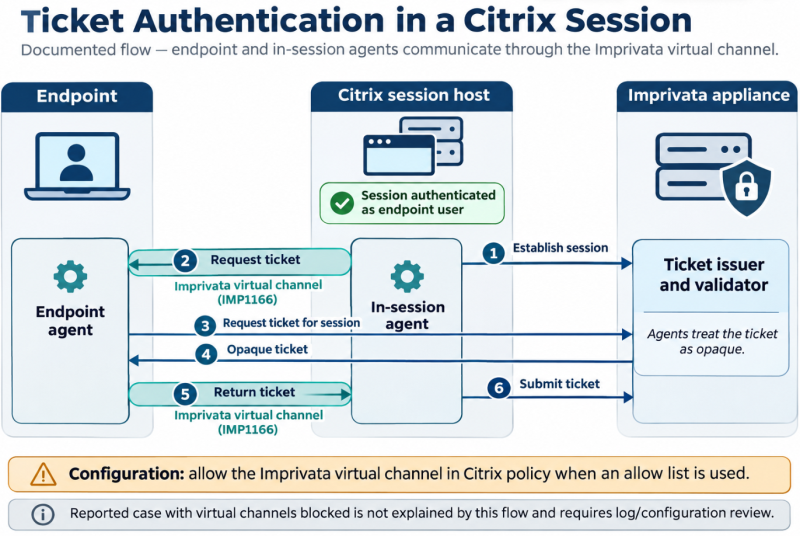
Three parties are involved in ticket authentication:
-
The endpoint agent, on the physical endpoint, which holds the authenticated user context
-
The in-session agent, inside the Citrix session host.
-
The Imprivata appliance, which issues and validates the ticket.
-
Establish session — The in-session agent establishes a session with the Imprivata appliance (the ticket issuer/validator).
-
Request ticket — The in-session agent requests a ticket from the endpoint agent over the Imprivata virtual channel (IMP1166).
-
Request ticket for session — The endpoint agent, which holds the authenticated user context, requests a ticket for that session from the appliance.
-
Opaque ticket — The Imprivata appliance returns an opaque ticket to the endpoint agent. The agents treat the ticket as opaque.
-
Return ticket — The endpoint agent returns the ticket to the in-session agent over the Imprivata virtual channel (IMP1166).
-
Submit ticket — The in-session agent submits the ticket to the appliance, which validates it. The session is now authenticated as the endpoint user.
Configuration
The Imprivata virtual channel must be allowed. Citrix’s Virtual channel allow list policy is enabled by default, which blocks the Imprivata channel.
Add IMP1166 explicitly to the allow list. See the Citrix virtual channel guidance.
Simply disabling the allow list is not sufficient, according to Imprivata testing.
Troubleshooting
If authentication into the session fails, confirm the virtual channel is allowed and the Imprivata agent is running both on the endpoint and in the session, then review the agent logs for the ticket request and submit steps above.


