 minute read
Configure Emergency Calls
Configure the ability for users to access the native dial pad from the Imprivata MDA lock screen to make a phone call.
You can configure Imprivata MDA to allow the user to call any phone number from the native dial pad, or you can define a preconfigured phone number.
This feature is configured via the AppConfig using an MDM.
See the Imprivata MDA AppConfig Reference for supported MDM AppConfig key/value pairs.
Workflow
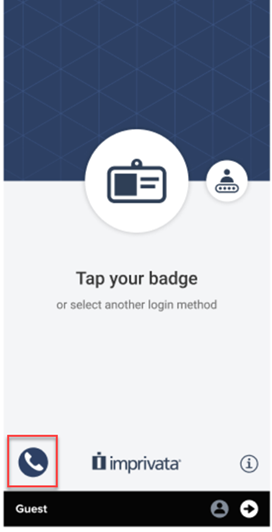
When MDA is locked, the user taps the emergency call icon on the lock screen, and is able to use the dial pad to make a phone call. Authentication to the device is not required to make a call.
Click to enlarge
Prerequisites
Take note of the following prerequisites:
-
Requires Imprivata MDA 8.1 or later.
Configure the Emergency Calls
To configure the emergency call feature, add the following key to your MDM:
-
The AppConfig Configuration Key field for this feature is "ConfigFlags".
-
The AppConfig Value Type for this feature is "String".
-
The AppConfig Value is emergencyCalls:<phone number>|skipConfirmation
-
where
-
emergencyCalls allows the user to access the dial pad to call any phone number by tapping the emergency call icon on the Imprivata MDA lock screen.
The colon symbol (:) is not required unless you are setting a preconfigure phone number, as below.
-
<phone number> allows you to configure a preconfigured phone number to dial.
-
Supports US and International phone number formats.
-
Acceptable values:
-
digits from 0 -9
-
For international phone numbers, add the + symbol.
For example, emergencyCalls:+12345678900.
-
-
-
skipConfirmation removes the confirmation dialog box that pops up before a call.
When skipConfirmation is not set, the confirmation dialog box is displayed. This is the default behavior.
For example, emergencyCalls:12345678|skipConfirmation.
The skipConfirmation flag is supported in MDA 8.2 and later.
-


