 minute read
On Failure
The Workflow actions available to you depend on the Workflow model you select, the MDM system you use, and the OS of your devices.
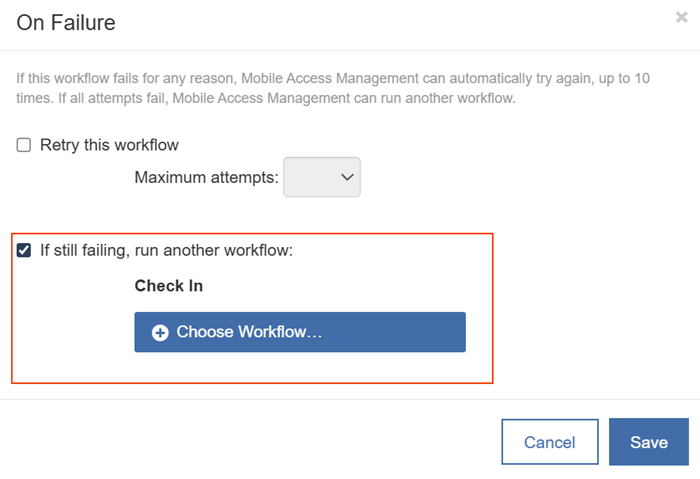
The On Failure workflow action allows you to specify what happens when a workflow fails for any reason.
-
You can have Mobile Access Management automatically retry the Workflow, up to 10 times.
-
If the Workflow still fails, you can specify an alternate Workflow to run.
-
For newly-created iOS Check Out Workflows, the On Failure action is automatically added to your workflow, with the action defaulted to Reboot and Check In on failure.
Edit the On Failure action to run another Workflow if the Check Out Workflow fails.
Existing customer Check Out Workflows are not modified.
-
For most other Workflows (Prep or Check In), you can add the On Failure action, with Retry this workflow selected and Maximum attempts set to 3.
To add the On Failure action to your Workflow:
-
In the MAM console, go to Workflows.
-
Create a new Workflow, or edit an existing Workflow.
-
Click Add an action > Advanced > On Failure.
Activity Display
If multiple attempts are required, MAM displays multiple "On Failure" attempts as a single activity. The activity log will display the number of attempts in parentheses.
Clicking on the activity to open the Deployment Details displays the detail of each attempt on its own tab.
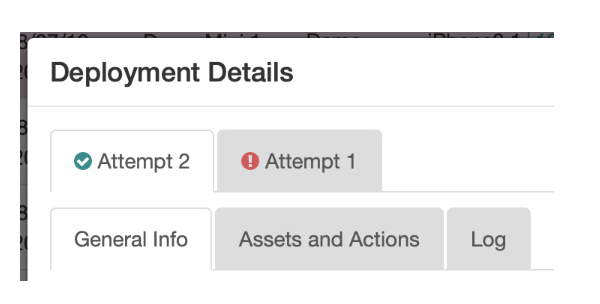
The API and Activity Export tab continues to show each attempt as a separate record.


