minute read
Erase
The Workflow actions available to you depend on the Workflow model you select, the MDM system you use, and the OS of your devices.
Erase, when added to a Workflow and deployed to a device, will erase devices to factory defaults. This is one of the most important actions within Mobile Access Management.
The erase feature only erases devices that have been activated, that is, at least partially set up. If the device has not been activated, it is already erased, and will not be erased again. This feature greatly speeds deployments.
Imprivata encourages you to include the Erase feature in almost every Workflow. Erasing a device means every deployment begins at a known state — erased — so all subsequent actions will have a predictable effect. This makes deployments much more reliable.
Erasure Method and Certifications
The Erase Device action performs a cryptographic erase, identical to Erase all Content and Settings. This process destroys all of the encryption keys in effaceable storage, rendering all user data on the device cryptographically inaccessible.
Mobile Access Management’s erase conforms to the following industry standards:
Erase as the Only Action
When Erase is used by itself within a Workflow, the device will not be supervised. The Erase action, by itself, removes supervision from devices.
Add the Erase Action to a Workflow
To add the Erase action:
-
In the MAM console, go to Workflows.
-
Create a new Workflow, or edit an existing Workflow.
-
Click Add an action > Erase.
-
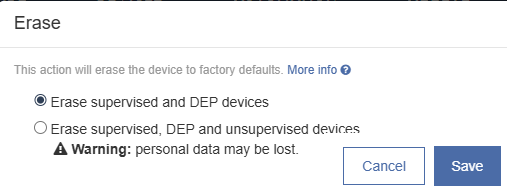
Select the options for erasing:
-
Supervised & ADE devices. This option is suitable for most use cases.
-
Supervised, ADE and unsupervised devices. This option exists as a safety, to help you avoid erasing devices by mistake.