 minute read
Troubleshooting the Imprivata Agent
The Imprivata agent software includes several utilities that assist in troubleshooting issues:
-
ISXTrace - use the trace utility (ISXTrace.exe) to create log files to help troubleshoot issues with Imprivata Customer Support.
-
Create a log file.
-
View the appliances the Imprivata agent connects to.
-
-
ISXMenu - use this helper utility (ISXMenu.exe) to emulate certain actions normally performed from the agent icon in the Windows system tray. Use this utility to trigger supported agent actions from a command prompt.
Use these utilities only under the direction of Imprivata Customer Support.
 Create a Log File
To create a log file with the trace utility:
-
Ctrl+click the Imprivata agent icon on the desktop notification area.
-
Click Trace Utility.
-
Click Logging Options.
Click to enlarge
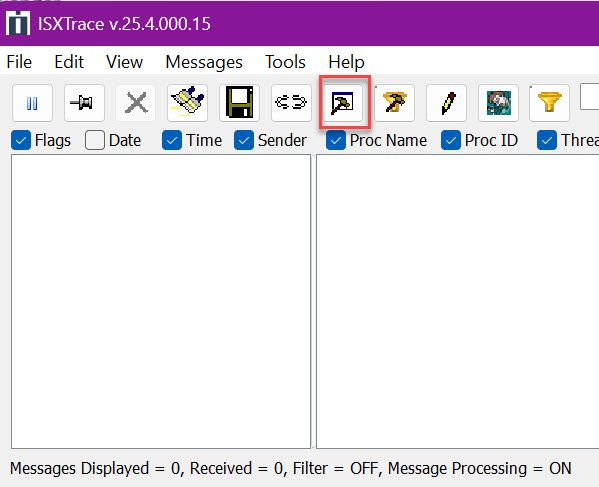
- Select the required log options, and click OK.
Viewing the Appliances the Imprivata Agent Connects To
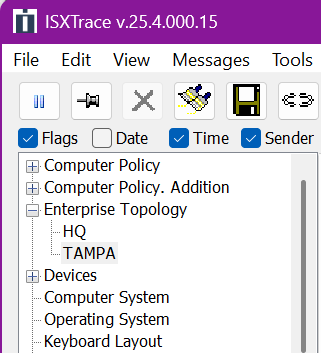
You can view the list of Imprivata appliances in your organization's enterprise topology using the trace utility.
-
Ctrl+click the Imprivata agent icon on the desktop notification area.
-
Click Trace Utility.
-
In Tools > Options, select the required log options and click OK.
-
In the DEBUG list, select CONFIG.
-
In the left pane, expand the Enterprise Topology item.
Click to enlarge
Remotely Enabling Agent Logging
You can enable logging at the policy level to help identify agent issues that occur intermittently across multiple computers. To enable agent logging from the computer policy:
-
In the Imprivata Admin Console, go to the Computers menu > Computer policies page.
-
Open the required computer policy.
-
On the General tab, go to the Agent logging section, and select Yes for Enable Agent Logging?.
Logs are stored locally at the following location:
C:\ProgramData\SSOProvider\Logs
Reviewing Imprivata Server Logs and Appliance Logs
In addition to ISXTrace logs, you can review the Imprivata server and appliance logs to troubleshoot a problem.
-
In the Imprivata Appliance Console, go to the System page > Logs tab.
-
Select the Imprivata server and appliance logs that you need.
-
Click Display Log to view the contents of the file. The log content is plain text. You can copy and paste the contents into a text editor or other application.
Emulate User Actions with the ISXMenu Utility
Use the ISXMenu utility to trigger supported agent actions from a command prompt.
Requirements
-
The Imprivata agent software installed and running on the endpoint.
-
Commands are run in an interactive user session.
Limitation
-
The ISXMenu utility is not suitable for use with PowerShell Extension Objects.
Syntax
"C:\Program Files (x86)\Imprivata\OneSign Agent\ISXMenu.exe" <command>Supported Commands
The ISXMenu utility supports the following commands:
| Command | Description |
|---|---|
about
|
Opens the About dialog. |
enable
|
Depending on the Imprivata agent state, enables or disables the agent or performs login or logoff. |
enroll
|
Launches Confirm ID enrollment, if licensed. |
reset
|
Resets the credentials. |
update
|
Performs Sync with server and updates agent data from the Imprivata server. |
state
|
Returns the current agent state. The state command returns a type value (this differs from the value shown in the registry):
|
ping
|
Forces an agent ping to the Imprivata server. |
|
Simulates the hotkey to lock the desktop. |
|
Suspends and resumes single sign-on. |
closeprivacyscreen
|
Closes the privacy screen if it has been configured to show for a long time. |
logoff
|
Requests to log off the user from the agent. |
getloggedinuser
|
Returns the current logged in EAM user. |
exit
|
Exits the agent. |
Examples
"C:\Program Files (x86)\Imprivata\OneSign Agent\ISXMenu.exe" update
"C:\Program Files (x86)\Imprivata\OneSign Agent\ISXMenu.exe" about
Additional Numeric Options
The ISXMenu utility supports the following numeric options:
| Numeric option | Description |
|---|---|
211 |
Enroll fingerprint |
212
|
Launches the Imprivata Admin Console interface. |
213
|
Displays the Password help page |
214
|
Opens Trace |
216
|
Manage Passwords |
226
|
Test agent license screen |
230
|
Displays the Getting Started screen |
239
|
Displays the Secure Walk Away Welcome screen |
240
|
Secure Walk Away camera positioning |


